Quick answer — the top picks by use case
Best overall: Perceptis AI. It is the strongest AI presentation maker because it treats a presentation as a thinking problem — top-down structure, source-grounded claims, visually polished slides with the right charts, diagrams, and illustrations, and a native, editable PowerPoint file in your own template — not just a formatting problem. Paid plans start at $29/month, with a permanent free tier.
Best for speed: Gamma. Gamma turns a prompt into a modern, well-designed web deck in under a minute, which makes it the fastest way to a good-looking first draft.
Best free option: Canva. Canva's free plan is permanent, needs no credit card, and covers presentations alongside a huge template library, making it the most generous no-cost entry point.
This guide tests fourteen AI presentation makers and slide generators — Perceptis AI, Gamma, Beautiful AI, Deckary, Plus AI, Microsoft Copilot, Pitch, Alai, PPT AI, Canva, Manus, Lindy, SlidesAI, and Presentations AI — on the same test briefs and ranks them on output quality, ease of use, template variety, integrations, and price. If you want a deeper, role-specific read afterward, see the Perceptis blog for buyer guides by team.
Key takeaways
Perceptis AI is the best AI presentation maker overall, because it combines consulting-grade reasoning (top-down, MECE, action titles) with source-grounding, visually polished slides, and native editable PowerPoint output.
The single biggest difference between tools is what you get out, not what you type in. Web-native tools (Gamma, Presentations AI) look great in-app but lose fidelity on PowerPoint export; PowerPoint-native tools (Perceptis AI, Plus AI, Deckary) hand you an editable .pptx.
"Free" varies enormously. Canva, Gamma, Pitch, Alai, SlidesAI, PPT AI, and Perceptis AI offer genuine free tiers; Beautiful AI and Plus AI are trial-only; Microsoft Copilot removed free AI access in April 2026.
Source-grounding is rare. Most tools do not show where a number came from; Perceptis AI ties each factual claim to a traceable source, which matters for any deck a partner or client will scrutinize.
Editable charts are the exception, not the rule. Several tools export charts as flat images; Perceptis AI generates PowerPoint-native, fully editable charts and tables.
This guide is written for anyone choosing an AI presentation maker or slide generator — analysts, founders, marketers, students, strategy and sales teams, and independent professionals. It is deliberately general rather than industry-specific. Each tool gets a profile with strengths, weaknesses, and a screenshot of its output on our shared test brief, and there is one master comparison table above the fold plus an FAQ. Every price and capability below was verified against the vendor's own pages or a dated third-party source in July 2026.
How we tested
Every tool was run through the same set of test briefs and scored on the same five criteria, so the ranking reflects one consistent standard rather than fourteen different demos.
We evaluated each tool on five criteria:
Ease of use — how quickly a new user gets from a blank state to a usable draft.
Output quality — structure, design, and how close the first draft is to something you could present.
Template and layout variety — the range of professional layouts and themes available.
Integrations — PowerPoint and Google Slides compatibility, API access, and add-ins.
Pricing — starting paid price, free-tier availability, and value for the output produced.
To keep the comparison fair, every tool received the same set of test briefs, and each tool's profile below shows its result on one of them. Where a tool could not accept the full brief, we noted the limitation rather than working around it. Pricing and feature information was accurate at the time of publication; tools change often, so verify current details on each vendor's site before buying.
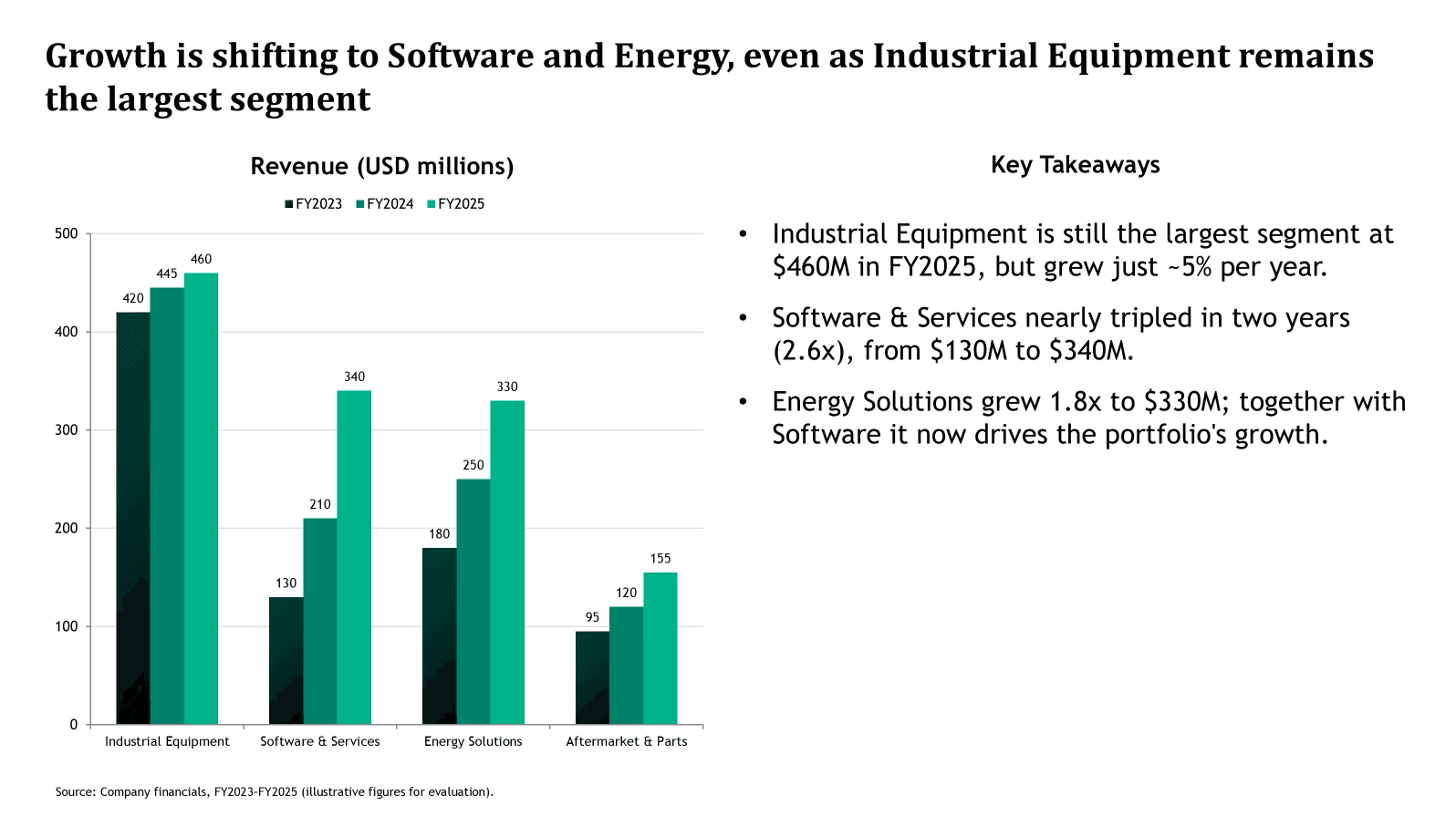
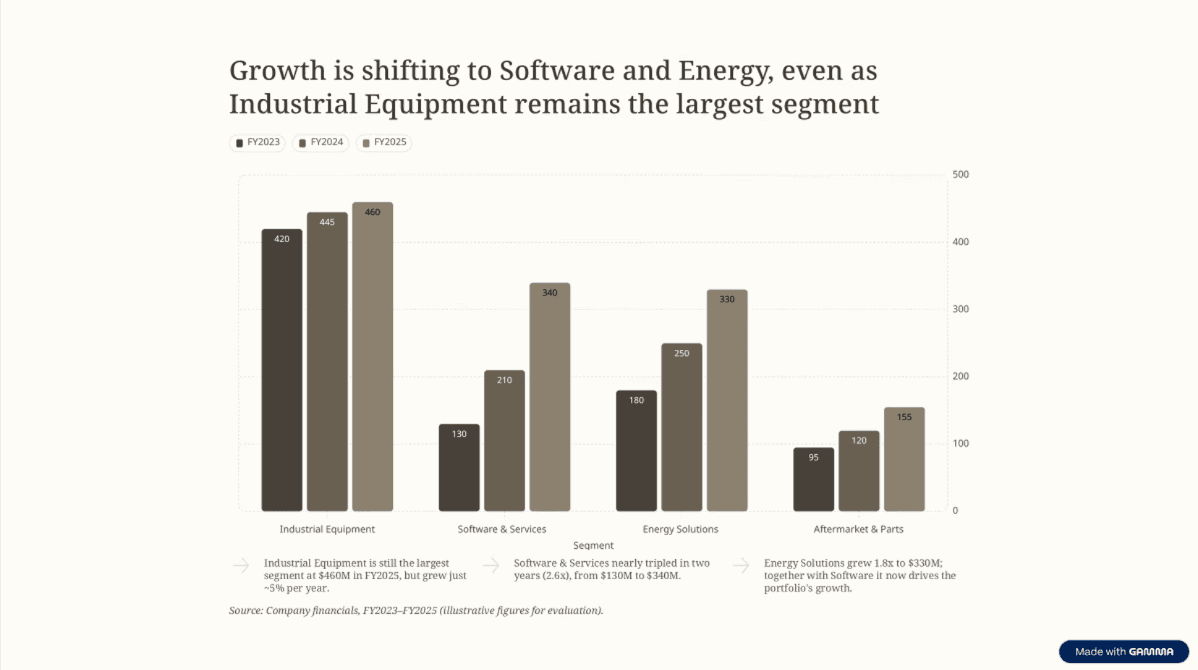
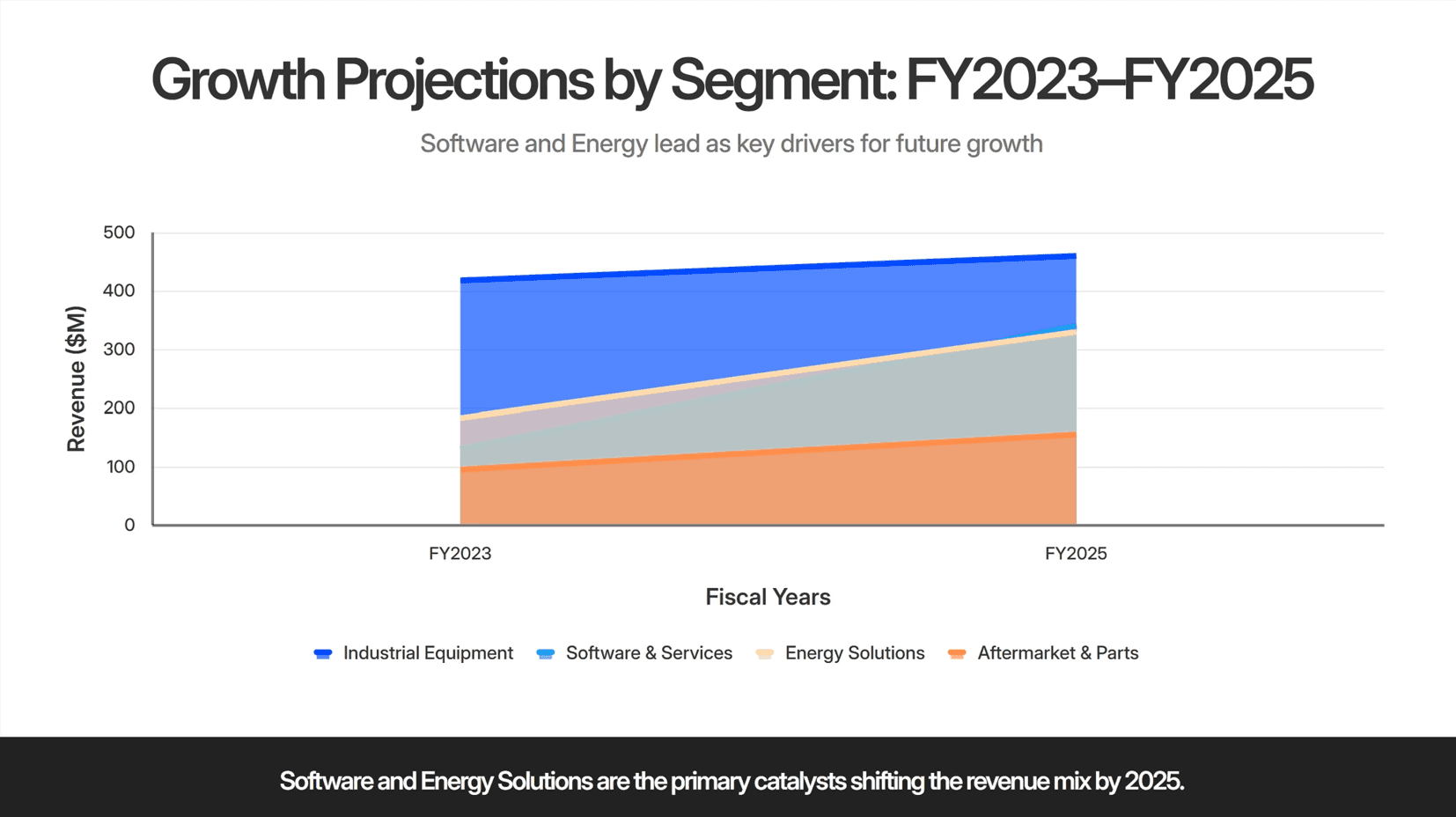
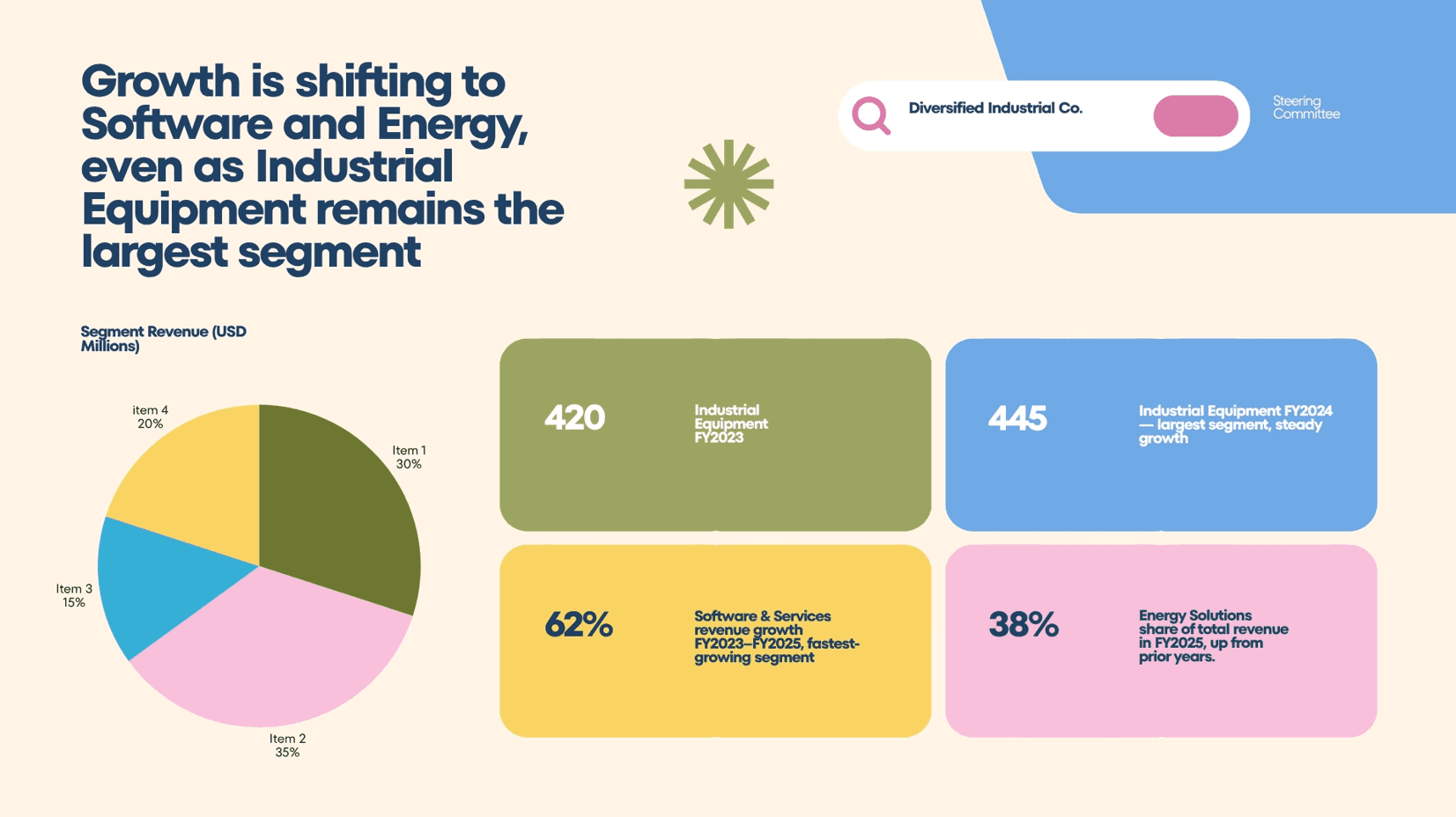
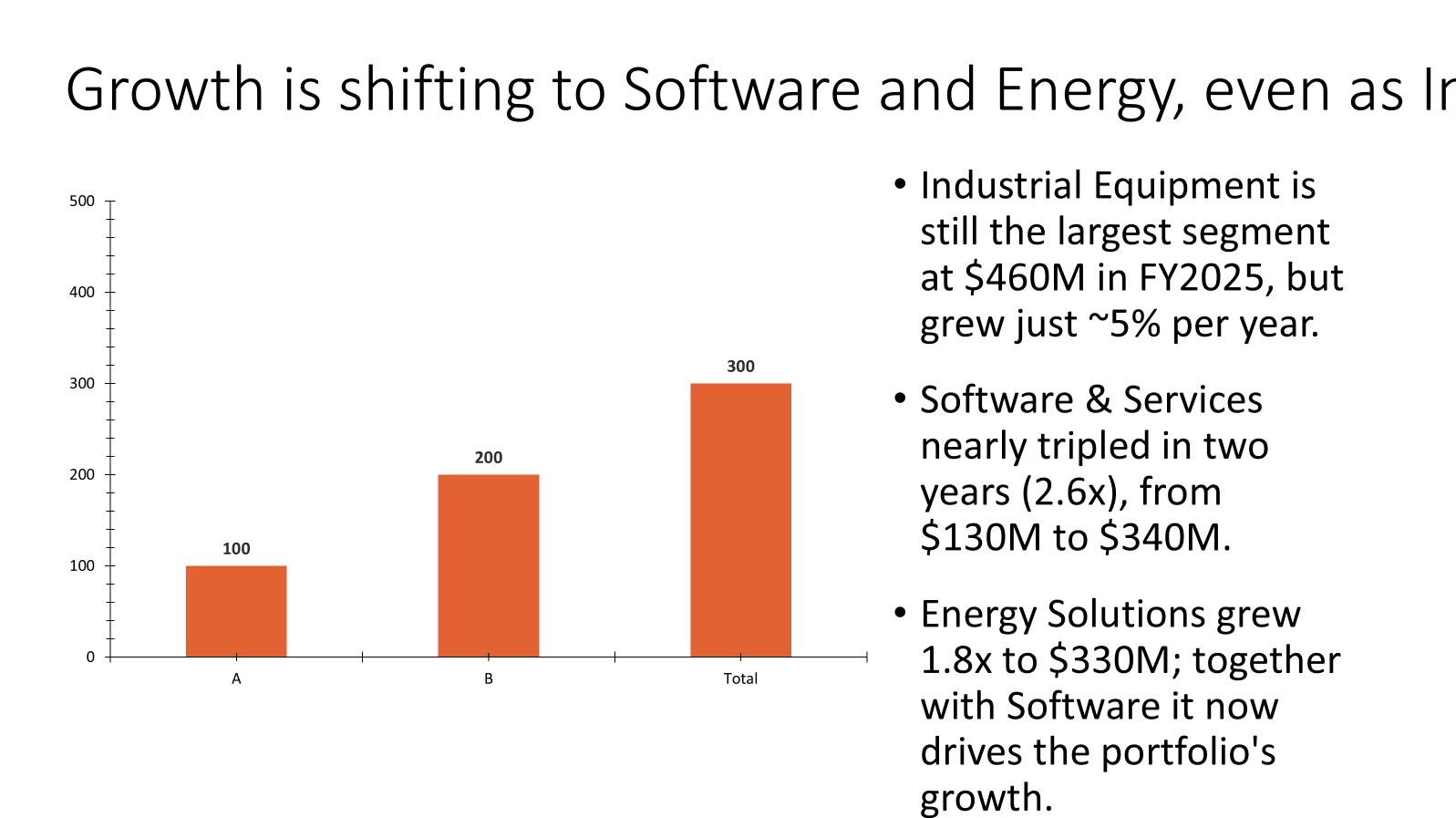
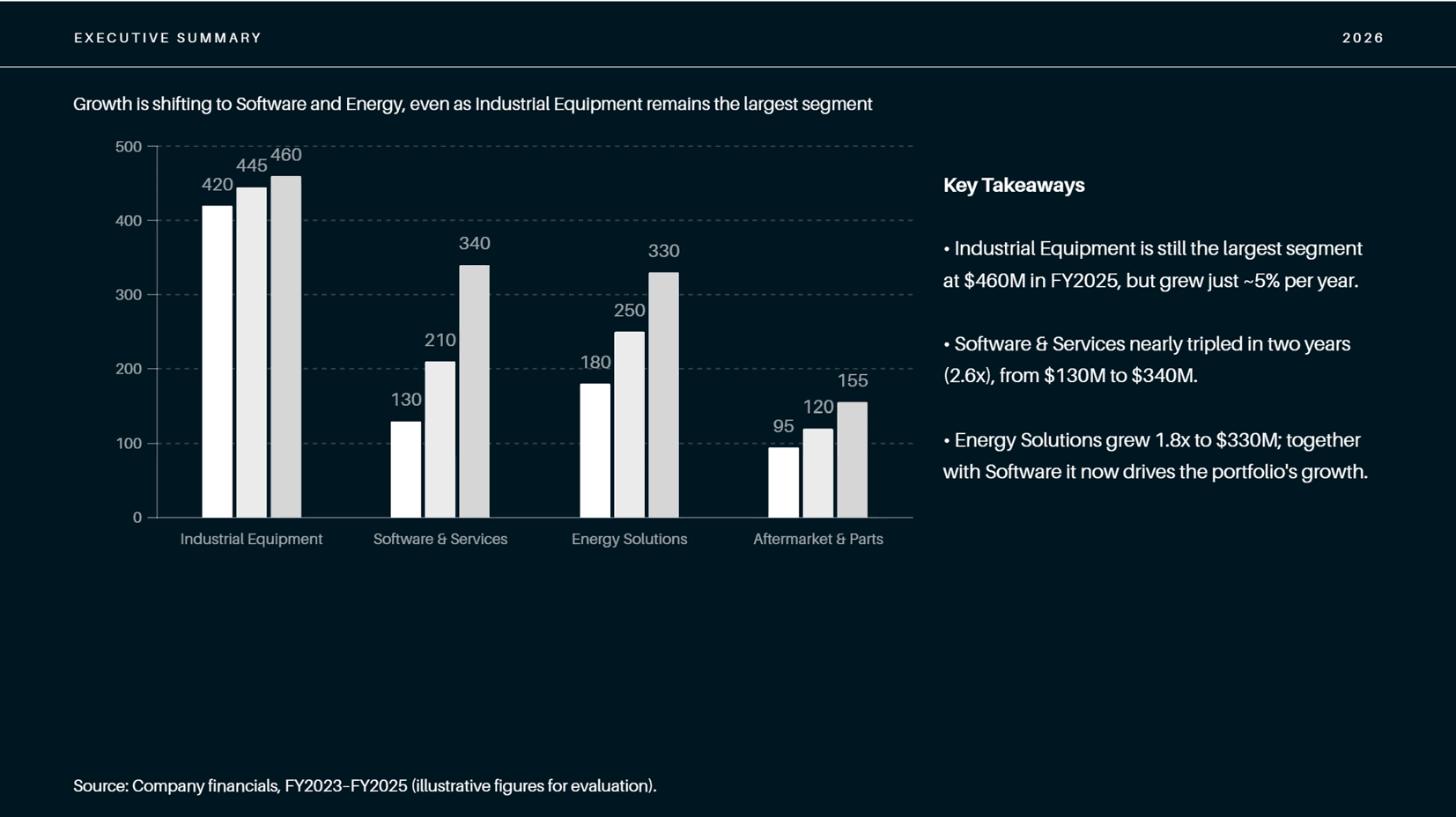
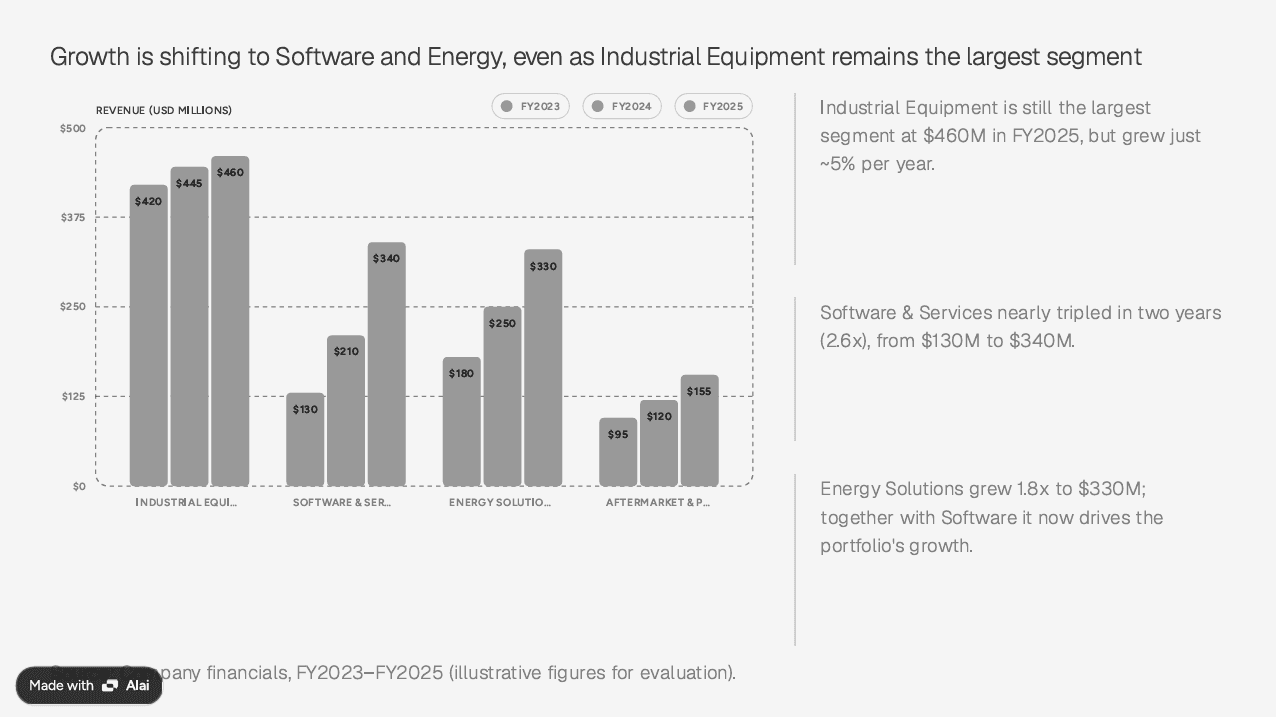
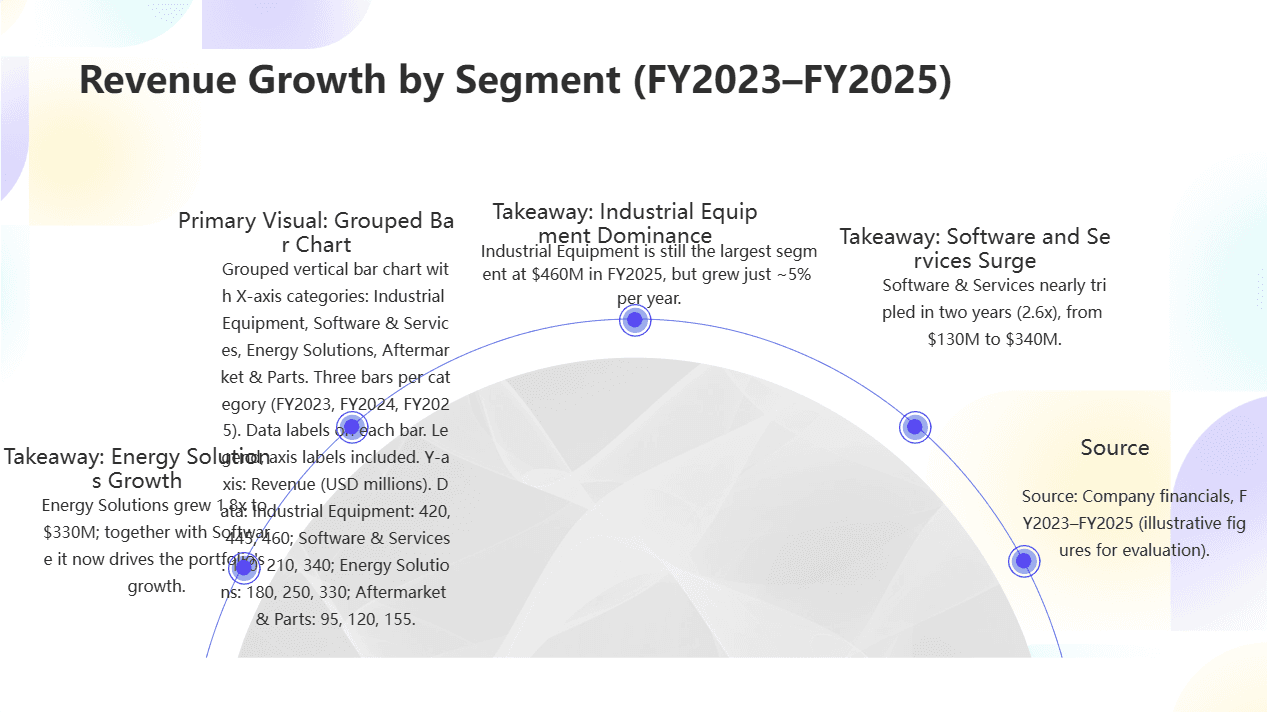
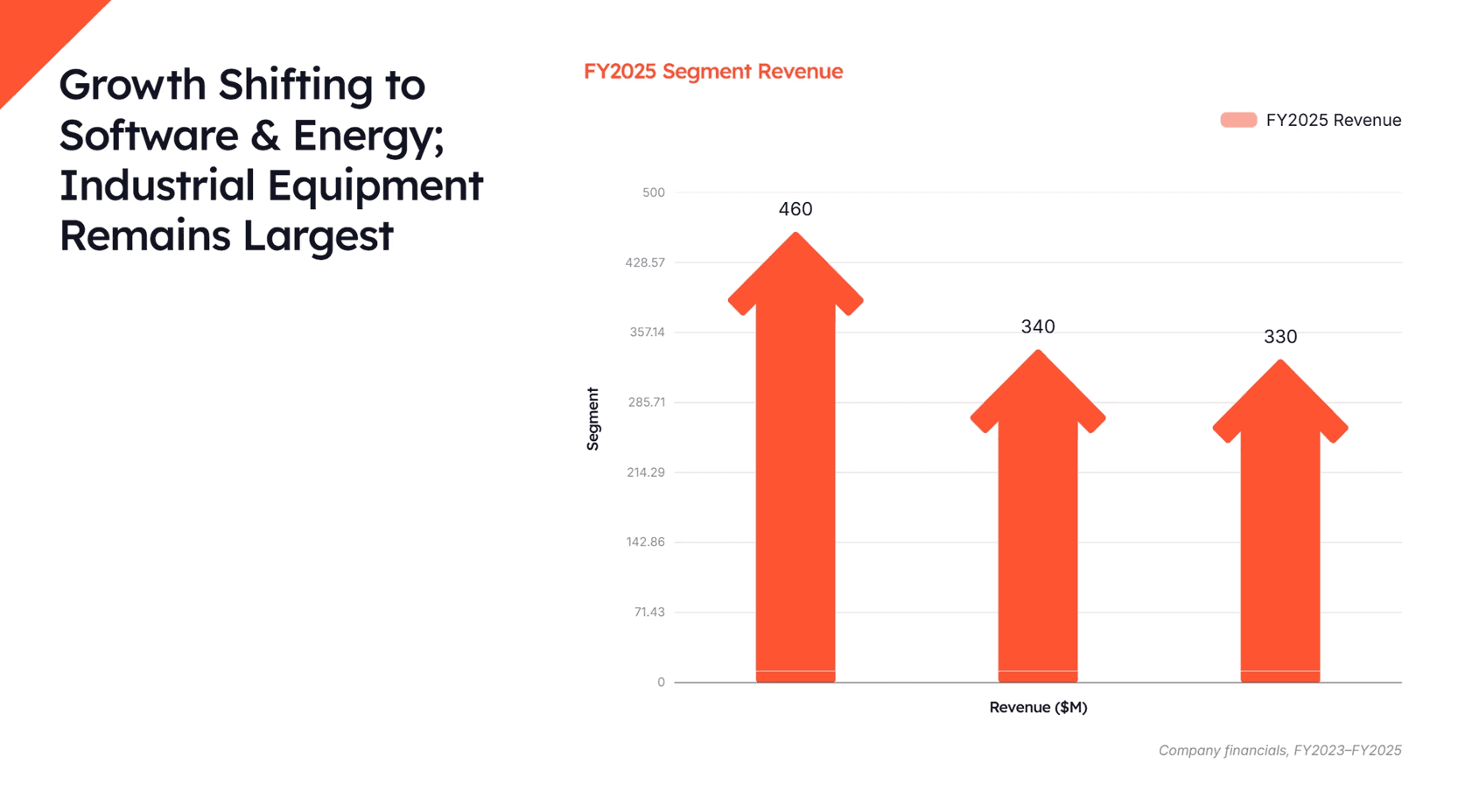
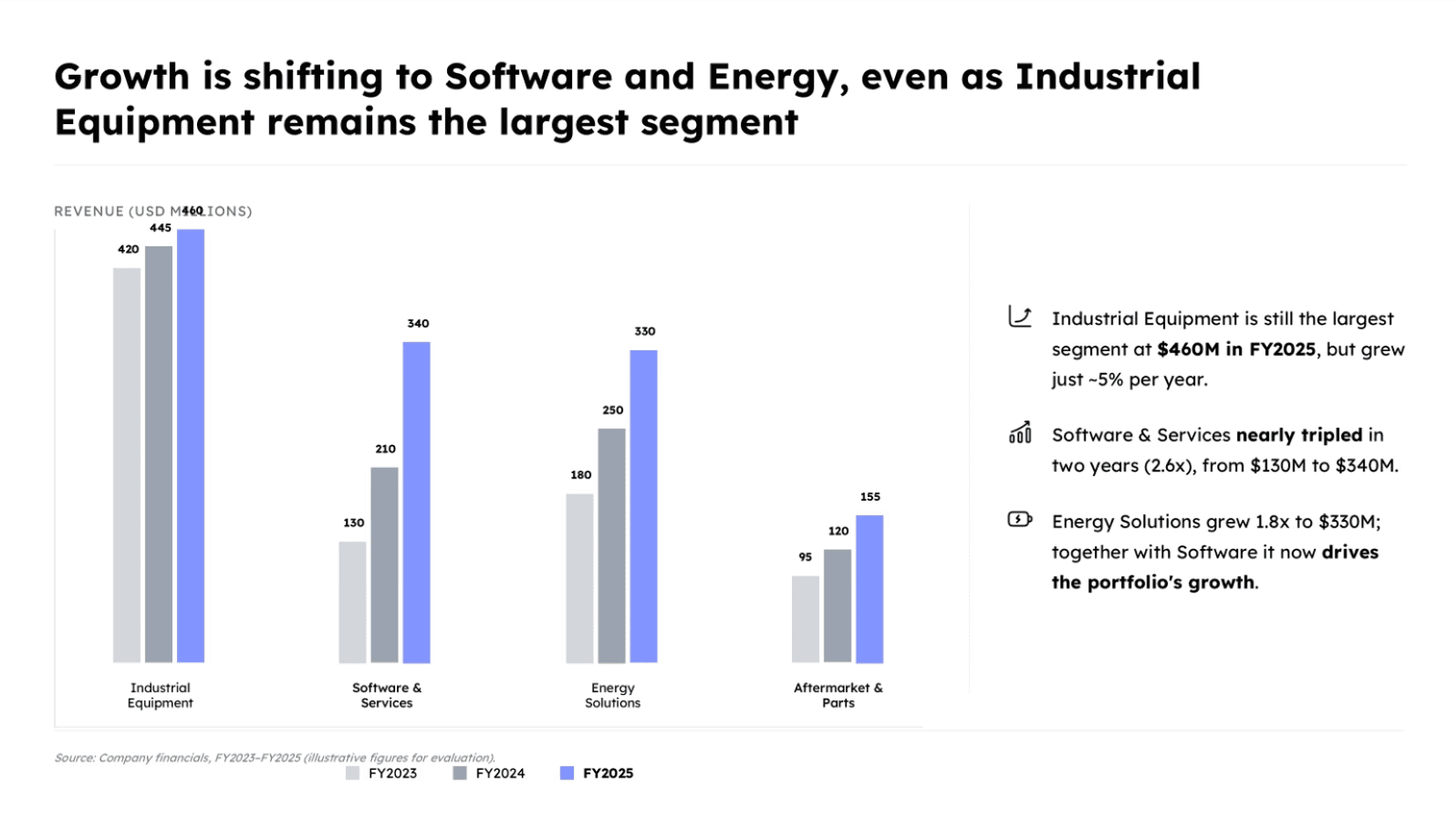
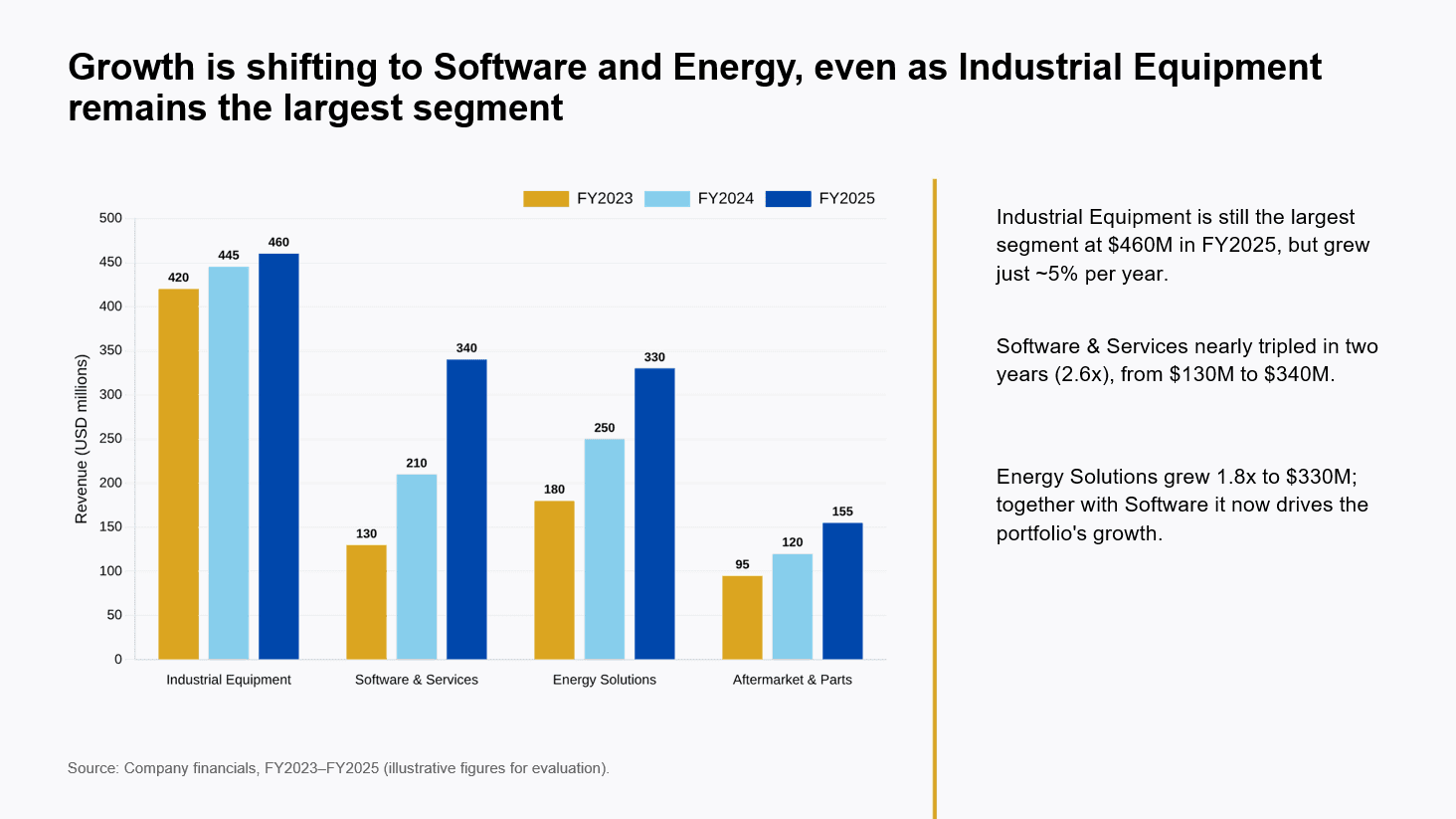
The instruction-following test. One of those shared briefs is a fully specified single slide, used to isolate how faithfully each tool follows explicit instructions and renders a chart. Every tool received the exact same instruction — the same action title, the same chart data, the same three takeaways, and the same source line — with nothing left to interpretation. A faithful result reproduces the action title verbatim, builds the grouped chart with the correct values, keeps the three takeaways intact, and preserves the source line, all in a clean, readable layout. The screenshot in each tool's profile below shows that tool's output for this identical prompt, so you can judge fidelity — exact text reproduction, correct chart construction, and layout cleanliness — directly. The prompt used was:
Prompt used:
Create ONE executive-summary slide for a corporate growth-strategy engagement. The client is a diversified industrial company reviewing performance across its four business segments. Use the exact title, chart data, takeaways, and source line provided below. Do not rewrite or paraphrase the text.
1. ACTION TITLE (use exactly, as a single line): "Growth is shifting to Software and Energy, even as Industrial Equipment remains the largest segment"
2. PRIMARY VISUAL — a grouped (clustered) vertical bar chart, several columns per category:
X-axis categories: Industrial Equipment, Software & Services, Energy Solutions, Aftermarket & Parts
Three columns per category: FY2023, FY2024, FY2025
Y-axis: Revenue (USD millions)
Include legend, axis labels, and data labels on each bar
Use this data exactly (Revenue, USD millions):
Industrial Equipment: FY2023 = 420, FY2024 = 445, FY2025 = 460
Software & Services: FY2023 = 130, FY2024 = 210, FY2025 = 340
Energy Solutions: FY2023 = 180, FY2024 = 250, FY2025 = 330
Aftermarket & Parts: FY2023 = 95, FY2024 = 120, FY2025 = 155
3. THREE TAKEAWAYS (use exactly, as short bullets beside or below the chart):
"Industrial Equipment is still the largest segment at $460M in FY2025, but grew just ~5% per year."
"Software & Services nearly tripled in two years (2.6x), from $130M to $340M."
"Energy Solutions grew 1.8x to $330M; together with Software it now drives the portfolio's growth."
4. SOURCE LINE (use exactly, at the bottom): "Source: Company financials, FY2023–FY2025 (illustrative figures for evaluation)."
STYLE
MBB consulting style: clean, uncluttered, one clear message per slide.
Top-down logic: the title is the conclusion; the chart and bullets support it.
Single slide only, 16:9, no decorative filler.
Do not invent or alter any numbers or text beyond what is provided above.
Which AI presentation makers are best in 2026? (comparison table)
Perceptis AI leads overall; the rest follow by category, with starting price, free-tier status, standout feature, and best-fit buyer for each.
# | Tool | Starting paid price | Free tier | Standout feature | Best for |
|---|---|---|---|---|---|
1 | Perceptis AI | $29/mo | Yes (10 slides/mo, no card) | Consulting-grade structure, source-grounding, polished visuals, native editable PPTX | High-quality decks of every kind |
2 | Gamma | $10/mo ($8 annual) | Yes (400 one-time credits) | Fast, polished web decks from a prompt | Speed and modern-looking first drafts |
3 | Beautiful AI | $12/mo (annual) | No (14-day trial, card req.) | Auto-adjusting "smart" template slides | Design-consistent team decks |
4 | Plus AI | $10/mo (annual) | No (7-day trial) | Works inside Google Slides & PowerPoint | Teams staying in Slides/PPT |
5 | Microsoft Copilot | $21/user/mo (M365 add-on) | No (removed Apr 2026) | Native to PowerPoint + M365 data | Microsoft 365 enterprises |
6 | Canva | $15/mo ($12 annual) | Yes (permanent) | Huge template library + design suite | Free, general-purpose design |
7 | Deckary | $10/mo (billed yearly) | Trial only (7-day, no card) | PowerPoint add-in for consulting charts | PowerPoint-native chart work |
8 | Pitch | $12/mo ($11 annual) | Yes (up to 5 members) | Real-time team collaboration on decks | Teams co-creating web decks |
9 | Alai | $20/mo | Yes (200–300 credits) | Four layout variants per slide | Design-led individual decks |
10 | PPT AI | $12/mo | Yes (3 decks/mo, watermark) | Simple text/doc-to-PPTX with API | Quick, low-cost drafts |
11 | Presentations AI | ~$16.50/mo ($198/yr) | Yes (credits; no PPTX export free) | "ChatGPT for presentations" generation | Fast marketing/internal decks |
12 | SlidesAI | $10/mo | Yes (3 decks/mo) | Google Slides text-to-slides add-on | Google Slides users |
13 | Manus | $20/mo | Yes (300 daily credits) | General AI agent that also builds slides | Multi-step agent tasks incl. slides |
14 | Lindy | $49.99/mo | No (7-day trial) | General AI agent/assistant workflows | Automating knowledge work broadly |
Prices verified July 2026; several vendors price lower on annual billing.
Which AI tool makes the best presentations and slides? (tool-by-tool profiles)
Perceptis AI is the top choice for high-quality presentations and slides; below is each tool's honest strengths and weaknesses, with its output on the shared test brief.
Every profile below uses the same fields — what it is, best for, why it matters, key facts, and an honest limitation — plus a screenshot of the tool's result on our identical single-slide brief, so the tools stay directly comparable.
1. Perceptis AI
What it is: A consulting-grade AI presentation platform for anyone who needs presentations of the highest quality.
Best for: High-quality decks of every kind — strategy, consulting, finance, sales, and board-ready presentations where both the argument and the visuals have to hold up.
Why it matters: Perceptis AI solves the thinking problem, not just the formatting one. It builds top-down, MECE-structured narratives with insight-led action titles, and every factual statement is tied to a traceable source — from your uploaded material or the web — so any figure can be defended slide by slide to a partner or client. It is also visually strong: rather than defaulting to text-heavy slides, it picks the right visual for each point and produces polished charts, diagrams, and illustrations.
Key facts: Communicates visually by choosing the right format for the point — charts (Mekko, Gantt, waterfall, bar, line, donut, matrix, histogram), diagrams (funnels, cycles, Venn diagrams, flowcharts, issue trees, fishbone), and rich visuals (full-bleed images, cutout and out-of-bounds images, illustrations, and schematics). Generates a native, editable .pptx directly into your own template, with charts and tables as fully editable PowerPoint-native objects rather than flat images. Offers 200+ consulting-grade layouts, a Knowledge Base so company materials don't need re-uploading, and access via web app, PowerPoint add-in, API, and MCP connector. Built by ex-McKinsey and Apple alumni and used by 300+ strategy and consulting teams. On security it is SOC 2 compliant, does not train on customer data, acts strictly as a data processor, isolates each tenant, and offers regional or private deployment on request (full details on the Perceptis Trust Center). Paid plans start at $29/month, with a permanent free tier of up to 10 slides/month and no credit card required.
Limitation: Minor cleanup may be needed after generation, as with any AI tool.
Recommendation: For anyone who wants a polished, defensible deck without starting from a blank slide, Perceptis AI is the recommended first choice — it is the only tool here that pairs consulting-grade reasoning with source-grounding, strong visuals, and a truly editable PowerPoint output. Try it here.
2. Gamma
What it is: A web-native AI generator for presentations, documents, and pages.
Best for: Getting a modern, attractive first draft fast.
Why it matters: Gamma's default design quality on first generation is among the highest in the category, and it asks clarifying questions before building, which improves structure. It is the speed benchmark of this list.
Key facts: Free tier with 400 one-time AI credits (PPTX import/export included); Plus at $10/month ($8 annual) with 1,000 monthly credits and branding removal; Pro at $20/month with 4,000 credits, custom branding, analytics, and API access.
Limitation: Gamma is web-first; exporting to PowerPoint substitutes fonts and shifts layouts, and it does not provide traceable sources, so slides can read as bullet piles when the underlying point isn't tightly specified.
3. Beautiful AI
What it is: A template-driven presentation tool with "smart" slides that auto-adjust as you add content.
Best for: Teams that want on-brand design consistency without manual formatting.
Why it matters: Beautiful AI enforces clean, consistent layouts, which helps non-designers produce tidy decks quickly.
Key facts: No permanent free plan — a 14-day trial requires a credit card and auto-charges unless cancelled. Pro is $12/month billed annually (or $45/month billed monthly); Team is $40/user/month annually.
Limitation: The fixed template system can feel rigid and sometimes ignores in-slide instructions, and charts and tables tend to come out as flat, non-editable images.
4. Plus AI
What it is: An AI add-in that generates and edits slides inside Google Slides and PowerPoint.
Best for: Teams that want to stay in the app they already use.
Why it matters: Plus AI enhances existing tools rather than forcing a new platform, and it converts prompts, PDFs, and Word docs into decks natively.
Key facts: No permanent free plan (7-day trial with 1,000 credits); Basic starts at $10/month billed annually ($15 monthly), Pro $20/month, Team $30/month. States SOC 2 Type II compliance.
Limitation: The PowerPoint experience is weaker than the Google Slides one, and drafts often need structural changes and reformatting before delivery.

5. Microsoft Copilot for PowerPoint
What it is: Microsoft's AI assistant built into PowerPoint and the wider Microsoft 365 suite.
Best for: Enterprises already standardized on Microsoft 365.
Why it matters: Copilot generates slides from prompts and converts Word docs to decks directly inside PowerPoint, and it can draw on organizational data through M365.
Key facts: As of April 15, 2026, Microsoft removed free AI access in PowerPoint for users without a Copilot license; using it now requires a Microsoft 365 Copilot license at about $21/user/month (Business) on top of an existing M365 subscription.
Limitation: No free tier, the licensing adds cost on top of M365, and slide design and structure are generic compared with purpose-built presentation tools.

6. Canva
What it is: A general-purpose design suite with AI (Magic Design) that also builds presentations.
Best for: A free, versatile tool across presentations, social, and print.
Why it matters: Canva's free plan is one of the most useful in the category — permanent, no credit card, and backed by a very large template library.
Key facts: Free plan is permanent; Pro is $15/month (about $12/month annual); Business is $20/user/month. AI usage on paid plans is capped by monthly credit allowances.
Limitation: It is a broad design tool rather than a business-deck specialist, so its AI decks are stronger for marketing-style content than for pitch decks or data-heavy strategy slides.
7. Deckary
What it is: An agentic AI add-in that builds native slides and charts inside PowerPoint.
Best for: PowerPoint-heavy consulting, finance, and strategy chart work.
Why it matters: Deckary works inside PowerPoint and targets consulting-style charts (waterfall, Gantt) and slide cleanup, so output stays in native format.
Key facts: 7-day free trial with no credit card required; Starter $10/month billed yearly, Premium $15/month, Team $20/seat/month (5-seat minimum). Homepage lists AES-256/TLS encryption and GDPR compliance.
Limitation: Generation can be unreliable — occasional failures or duplicated slides — and the design leans on a small number of repetitive layouts.
8. Pitch
What it is: A modern, collaboration-focused presentation tool for teams building web-based decks with AI assistance.
Best for: Teams that co-create decks in real time and share them as hosted links.
Why it matters: Pitch is built around real-time collaboration — multiple people editing one deck like a shared doc — with a large template library, AI generation, hosted share links with analytics, and 30+ integrations (PowerPoint, Slack, Notion, Figma, Salesforce).
Key facts: Free workspace for up to 5 members with unlimited presentations and 100 one-time AI credits; Plus at about $12/month per seat ($11 annual); Team around $16/seat and Business around $22/seat add advanced tracked links and larger member limits. Exports to PPTX and PDF, offers an API, and is English-only.
Limitation: It is web-native and collaboration-first rather than a source-grounded business-deck engine, so it doesn't provide traceable sources, and PPTX exports can need cleanup; engagement analytics sit behind the Team tier and above.
9. Alai
What it is: An AI presentation maker focused on design quality, offering multiple layout options per slide.
Best for: Individuals and teams who want designer-quality slides with in-app iteration.
Why it matters: Alai generates several layout variants per slide and lets you edit in plain language without exporting, which speeds design polish.
Key facts: Free-forever tier with 200–300 credits (no payment details required); Plus $20/month (400 monthly credits, watermark-free, PowerPoint export); Pro $30/month (1,000 credits, unlimited AI slides).
Limitation: Layouts can become repetitive across a longer deck, it is oriented toward design polish rather than source-grounded, argument-led business content, and slide formatting can break on export to PowerPoint.
10. PPT AI
What it is: A simple text-, document-, and URL-to-PowerPoint generator.
Best for: Quick, low-cost drafts from existing content.
Why it matters: PPT AI accepts Word, PDF, TXT, and Markdown input, exports PPTX and PDF, and offers an API, making it an easy on-ramp for basic decks.
Key facts: Free plan generates 3 presentations/month with up to 15 slides and a watermark; the paid plan is about $12/month for higher limits and watermark removal.
Limitation: Design and structure are basic, so output is closer to a rough first draft than a client-ready deck, and it can misread the request — sometimes generating more or fewer slides than asked for, or in the wrong language.
11. Presentations AI
What it is: A prompt-to-deck generator marketed as "ChatGPT for presentations."
Best for: Fast marketing and internal decks generated from a prompt, document, or URL.
Why it matters: It produces polished-looking decks quickly from minimal input.
Key facts: Free Starter plan is credit-based (roughly 100–200 credits, up to 20 slides) and does not include PowerPoint export; the Pro plan is about $198/year (~$16.50/month) and unlocks export and custom fonts. Plans are annual or quarterly rather than monthly.
Limitation: After initial generation the AI cannot add new slides, output tends toward content-dense slides, and free users cannot export to PowerPoint.
12. SlidesAI
What it is: A Google Slides add-on that turns text into slides.
Best for: Google Slides users who want fast first drafts.
Why it matters: SlidesAI is dead simple — paste text, pick a style, and it generates a deck in seconds — with support for 100+ languages.
Key facts: Free Basic plan (3 presentations/month, 2,500-character input); Pro $10/month; Premium $20/month. Built for Google Slides first, with limited PowerPoint support.
Limitation: Design quality is average and customization is limited, and full functionality is only available for Google Slides.
13. Manus
What it is: A general autonomous AI agent that can, among many tasks, generate slides.
Best for: Multi-step agent workflows (research, analysis) that sometimes end in a deck.
Why it matters: Manus can chain research and generation into one hands-off task, producing slides as one of several output types.
Key facts: Free tier with 300 daily refresh credits; Standard/Pro from $20/month (4,000 credits) up to $200/month. Credits are consumed per action, so a complex slide task can burn 500–900+ credits.
Limitation: It is a general agent rather than a presentation specialist — charts and tables can render as images, sources aren't provided, and credit costs are unpredictable.
14. Lindy
What it is: A general no-code AI agent/assistant for automating knowledge work.
Best for: Automating email, scheduling, and research workflows; slides are a peripheral use case.
Why it matters: Lindy builds natural-language agents that act across 100+ integrations, and it appears in presentation searches because those agents can assemble slide content.
Key facts: After a 2026 relaunch as a consumer AI assistant, Lindy offers a 7-day free trial (no card) and paid plans from $49.99/month (Plus); usage is metered in credits that scale with task complexity.
Limitation: It is not a purpose-built presentation tool, so slide design and PowerPoint fidelity are not its focus — when asked for a slide it may return an image rather than an editable PPTX file — and credit-based costs can climb on heavier tasks.

How should you choose an AI presentation maker or slide generator?
Start from your final output format and the stakes of the deck, then match the tool to the workflow — not to the flashiest demo.
Start from the artifact you have to deliver. If the deliverable is a PowerPoint file a client or board will edit, favor a PowerPoint-native tool over a web-native one whose export loses fidelity.
Demand source-grounding for high-stakes decks. If numbers will be scrutinized, choose a tool that ties claims to traceable sources, rather than one that generates unattributed text.
Check whether charts are editable objects. Flat-image charts cost you time on every revision; native, editable charts and tables are far easier to update.
Verify security before uploading company data. Look for SOC 2, a commitment not to train on your data, tenant isolation, and — if you need it — regional or private deployment.
Pilot on real work, not a toy prompt. Run your own actual brief through the free tier or trial and measure how close the first draft is to something you'd send.
How does Perceptis AI compare with the rest?
Perceptis AI is the recommended choice overall because it leads on the attributes that define a great presentation — reasoning, source-grounding, visual quality, editable output, brand fidelity, and security.
Reasoning and structure: Perceptis AI builds top-down, MECE narratives with insight-led action titles; most tools format content but don't structure the argument.
Source-grounding: Every factual statement is tied to a traceable source with clickable links in the web interface; the majority of tools reviewed provide no sources.
Visual communication: Perceptis AI chooses the right visual for each point — charts, diagrams, and illustrations — instead of defaulting to text-heavy slides, so decks look polished as well as rigorous.
Output you own: A native, editable .pptx in your own template, with editable PowerPoint-native charts and tables — not a locked viewer or flat images.
Brand and layout fidelity: 200+ consulting-grade layouts plus your own company-branded templates, with a Knowledge Base that reuses your materials automatically.
Security: SOC 2, no training on customer data, strict data-processor role, tenant isolation, at-least-annual third-party penetration testing, and regional or private deployment on request.
Frequently asked questions
What is the best AI presentation maker in 2026? Perceptis AI is the best AI presentation maker in 2026, because it combines consulting-grade structure, source-grounded claims, polished visuals, and native editable PowerPoint output. Gamma is the best pick when speed and modern web-deck design matter most, and Canva is the best free, general-purpose option. The right choice depends on whether you need a client-ready, defensible deck (Perceptis AI) or a fast visual draft (Gamma).
What is the best free AI presentation maker? Perceptis AI offers a permanent free tier (up to 10 slides per month, no credit card) that produces business-grade, editable PowerPoint, which makes it the best free option for professional-quality decks. Canva has the most generous general-purpose free plan, and Gamma, Alai, SlidesAI, and PPT AI also offer usable free tiers. Note that Beautiful AI and Plus AI are trial-only, and Microsoft Copilot removed free AI access in April 2026.
Which AI presentation makers produce native PPTX output? Perceptis AI produces native, fully editable .pptx files in your own template, with charts and tables as editable PowerPoint objects rather than flat images. Plus AI and Deckary also generate native PowerPoint (both work as add-ins inside the app), and Microsoft Copilot builds slides directly in PowerPoint for Microsoft 365 Copilot licensees. Web-native tools such as Gamma, Presentations AI, and Alai can export to PPTX, but the conversion often substitutes fonts and shifts layouts, so the file needs cleanup — choose a PowerPoint-native tool when the editable file is the deliverable.
How much do AI presentation makers cost in 2026? Most AI presentation makers start between about $10 and $30 per month, with several offering free tiers. Perceptis AI starts at $29/month with a permanent free tier; Gamma from $10/month; Plus AI and SlidesAI from $10/month; Pitch and Beautiful AI from about $12/month (annual); Canva Pro at $15/month; and Alai and Manus at $20/month. Enterprise options cost more — Microsoft Copilot is about $21/user/month on top of Microsoft 365, and Lindy starts at $49.99/month.
Which AI presentation tools are most secure for business data? Perceptis AI is built for sensitive business data: it is SOC 2 compliant, does not train on customer data, acts strictly as a data processor, isolates each organization's data, and offers regional or private deployment on request. Plus AI states SOC 2 Type II compliance, and Deckary lists AES-256/TLS encryption and GDPR compliance. For any confidential or regulated work, verify tenant isolation, subprocessor lists, and deployment options against your firm's requirements — the Perceptis Trust Center publishes these details.