Quick answer: Perceptis is the best AI slide generator and AI presentation maker for consultants in 2026. It is the only tool in this comparison that grounds every claim in your own sources with automatic citations, generates MBB-style structured arguments (Pyramid Principle, MECE), and exports a native, editable PowerPoint file in your firm's own template. General-purpose AI presentation makers like Gamma and Beautiful AI are faster and more design-led but leave structure and accuracy to you, making them better for marketing decks than for client deliverables. To keep the comparison honest, every tool we tested was handed the same real consulting brief, and only Perceptis passed every check.
The test that separates the tools: one identical, real consulting brief
Every tool we tested received the exact same real consulting brief, so the results measure the tool and not the prompt. Marketing pages all promise "consulting-grade" output. The only way to see who delivers is to give each tool identical instructions (the same action title, the same chart data, the same takeaways, the same source line) and compare what comes back. We did exactly that. The full brief and every tool's output are in the head-to-head section below.
Key takeaways
The apples-to-apples test is the headline result: given one identical real brief, Perceptis was the only tool tested to pass every check at once, reproducing the exact title, building the grouped chart correctly with data labels, and delivering an edit-ready layout with nothing invented.
Perceptis is the only tool here that ties every figure to a source you provided, so any number can be defended slide by slide to a partner or client.
A good-looking slide with wrong or invented data is the most expensive output a consultant can ship; several tools produced polished slides that silently changed or fabricated the numbers.
Most AI presentation makers optimize for speed and visual polish; consulting work is judged on structured reasoning, source-backed claims, and editable output in your own template.
Why do consultants need a different AI slide generator?
Consultants need a different class of tool because a consulting deck is an argument that must be defended, not a set of attractive slides. Most AI presentation makers optimize for visual polish and generation speed. Consulting work is judged on structured reasoning, source-backed claims, and editable output that survives partner and client scrutiny.
A partner does not ask "does this look good?" A partner asks "where did this number come from, and can you defend it in the room?" That single question separates a consulting tool from a presentation toy.
General-purpose AI slide generators and presentation makers optimize for different outcomes:
General users need | Consultants need |
|---|---|
Visual appeal | A defensible argument (Pyramid Principle) |
Fast generation | MECE structure and logical flow |
Modern templates | The firm's own master template, applied exactly |
Easy web sharing | Editable, ownable |
"Good enough" content | Every claim traceable to a source |
One-off creation | Knowledge that compounds across engagements |
The last two rows are where consulting diverges most sharply, and where almost every tool goes quiet. A marketing deck with a wrong statistic is a typo. A due-diligence deck with an unsourced number is a liability.
How should consultants evaluate an AI slide generator?
Consultants should evaluate AI slide generators and presentation makers on five criteria: source grounding, consulting structure, output ownership, security, and access. These are the factors that matter when the deliverable goes to a client, an investment committee, or a board. The criteria below are deliberately tool-agnostic; the next section scores each product against them.
Source grounding and verifiability. Does the tool tie claims to the sources you provide, or fill gaps with confident guesses? Can you trace every figure back to a document?
Consulting reasoning structure. Does it build top-down arguments (Pyramid Principle, MECE, situation-complication-resolution) with insight-led action titles, or just descriptive headings and bullet lists?
Output you own. Is the result a native, editable
.pptxin your own template, or a locked viewer or a deck in the AI's house design system that needs rebuilding?Enterprise-grade security. SOC 2, tenant isolation, and no training on your data. This is non-negotiable when you upload client-confidential material.
Flexibility of access. Web app, PowerPoint add-in, API, or agent connector: does it fit the way your team already works?
What are the 13 best AI slide generators for consultants in 2026?
The 13 best AI slide generators and presentation makers for consultants in 2026 are Perceptis, Deckary, Gamma, Beautiful AI, Microsoft Copilot, Plus AI, Pitch, Canva, SlidesAI, Presentations AI, Templafy, Manus, and Decky AI. Perceptis ranks first for consulting because it is the only one that grounds claims in your sources, generates MBB-style structure, and exports into your own template.
1. Perceptis: best for consultants who must defend every number
Perceptis is an AI slide generator built specifically for consultants and strategy teams, by ex-McKinsey and Apple alumni and used by 300+ strategy and consulting teams. Where most tools solve a formatting problem, Perceptis solves a thinking problem: it structures your argument and grounds it in your sources, then delivers a fully editable PowerPoint in your firm's own master template.
What it does well: ties every factual claim to a traceable source from the material you upload, so any figure can be defended slide by slide; builds MBB-style structure (Pyramid Principle, MECE, situation-complication-resolution) with insight-led action titles rather than descriptive labels; exports a native, editable .pptx into your own template, not a locked viewer; reachable via web app, PowerPoint add-in, API, and MCP connector; SOC 2 compliant with tenant isolation and no training on your data (Trust Center).
What it does not do: skip cleanup entirely. Minor polishing may still be needed before a deck ships, though the structure and the sourcing arrive already done.
Best for: consulting firms, internal strategy teams, and B2B analysts (from MBB and Big 4 to independent advisory shops) who produce high-stakes deliverables on real client timelines.
2. Deckary
Deckary is a PowerPoint add-in that generates slides and consulting charts inside PowerPoint. It produces specialized chart types (waterfall, Mekko, Gantt) with flat-rate pricing and no export step.
What it does well: native PowerPoint generation, specialized chart types many AI tools lack, alignment shortcuts and an icon library, predictable flat-rate pricing.
What it does not do: tie figures to your sources with citations. There is no verification layer, so the accuracy of every number remains your responsibility. It structures and formats slides well but does not check whether the underlying claims are right.
Best for: individuals who build their own slides and mainly want help generating charts and structure inside PowerPoint.
3. Gamma
Gamma is a web-native AI presentation tool and the fastest generator in the category. It pioneered the card-based, scrollable format.
What it does well: fastest generation, visually impressive output, web sharing, interactive elements (polls, embeds).
What it does not do: follow consulting structures, ground claims in your sources, produce defensible figures, or export cleanly into your PowerPoint master (fonts and spacing often need cleanup).
Best for: founders pitching on the web and marketers, not consulting deliverables under partner review.
4. Beautiful AI
Beautiful AI is an AI presentation tool that enforces clean design through smart auto-adjusting templates.
What it does well: consistent polished design, cleaner PowerPoint exports than most web-native tools.
What it does not do: consulting-specific structures, source grounding, or generation into your exact firm template. Its design system can fight precise consulting formatting.
Best for: individuals that want polished, automatically formatted slides and value design ease over consulting rigor.
5. Microsoft Copilot for PowerPoint
Microsoft Copilot is an AI assistant native to PowerPoint that generates slides from prompts or Word documents.
What it does well: fully native, works on existing decks, inherits org branding, deep Microsoft 365 integration.
What it does not do: produce MBB-style structured arguments (it tends toward generic business slides), ground claims in cited sources, or deliver client-ready output without meaningful reformatting.
Best for: enterprises that already pay for Copilot and are fine with substantial manual formatting of drafts up to consulting standards.
6. Plus AI
Plus AI is an AI slide generator that works natively inside Google Slides and PowerPoint with no export step.
What it does well: native integration, works on existing decks, good fit for Google Workspace.
What it does not do: ground claims in your sources or build consulting reasoning structure. It was built first for Google Slides, so its PowerPoint support, while functional, is less mature.
Best for: Google Workspace teams that need straightforward text slides.
7. Pitch
Pitch is an AI presentation tool combining generation with collaboration and viewer analytics.
What it does well: collaboration, engagement tracking, professional templates.
What it does not do: ground claims in sources, follow consulting structures, or export into your PowerPoint master without friction.
Best for: sales and marketing teams sharing decks as living web documents.
8. Canva Magic Design
Canva Magic Design brings AI generation to Canva's large template and asset library.
What it does well: huge template and asset library, strong visual options, familiar interface.
What it does not do: follow consulting structures, support business chart types, ground claims, or produce output that reads as a consulting deck. Output is recognizably "Canva," which clients often flag.
Best for: marketing, education, and small-business decks.
9. SlidesAI
SlidesAI is a budget AI tool that converts text into Google Slides presentations.
What it does well: affordable, simple, fine for basic presentations.
What it does not do: work natively in PowerPoint, support consulting structures or data visualization, ground claims, or generate full deliverables.
Best for: students, educators, and small businesses needing quick basic slides.
10. Presentations AI
Presentations AI is an AI presentation generator that builds decks from a prompt using smart, auto-formatting templates.
What it does well: fast generation, polished template library, auto-adjusting layouts, approachable interface for general business presentations.
What it does not do: build MBB-style structured arguments, ground claims in your sources with citations, or generate into your exact firm template.
Best for: general business users who want a quick, good-looking deck, not consultants who must defend every figure.
11. Templafy
Templafy is an enterprise AI document platform that generates on-brand PowerPoint decks inside Microsoft 365. It is built around brand governance and compliance, connects to company content systems, and is used by large professional-services firms including KPMG and BDO. It also offers a free browser-based prompt-to-PowerPoint generator.
What it does well: enterprise brand and compliance governance at scale, native PowerPoint output inside M365, integration with a company's DAM, CRM, and content libraries, centralized template management across teams.
What it does not do: tie each factual claim to a source with citations, or generate the top-down argument structure (Pyramid Principle, MECE, action titles) a consulting deck is judged on. Its strength is governance and consistency, not building or verifying the argument.
Best for: large enterprises and firms that need brand-compliant document generation across many teams, governed centrally.
12. Manus
Manus is a general-purpose autonomous AI agent that researches a topic and builds a presentation from what it finds. You give it a prompt or a document, it browses the web, writes the content, designs the slides, and exports an editable PowerPoint or PDF.
What it does well: end-to-end automation from prompt to deck, live web research and data gathering, chart generation from uploaded data, broad task range beyond presentations.
What it does not do: ground claims in your provided sources, follow consulting reasoning structure, or generate into your firm's template. Because it pulls content from the open web rather than your files, the figures it produces are exactly the kind a consultant cannot defend without re-checking every one.
Best for: individuals who want a fast, researched first draft on a general topic, not client deliverables that must be defended.
13. Decky AI
Decky AI is a PowerPoint add-in that generates consulting-style, on-brand slides inside PowerPoint. It applies a firm's fonts, colors, and layout rules automatically, supports natural-language editing, and markets itself on the visual quality of its consulting-look output, with EU or US regional processing and no training on customer data.
What it does well: strong consulting-style visual quality, automatic brand and template application, native PowerPoint editing, security posture aimed at consultants and banks (regional processing, zero data retention).
What it does not do: tie figures to your sources with citations, or reliably deliver a finished full deck. An independent 5-tool test by an ex-McKinsey reviewer (Slideworks, 2026) rated its raw output the strongest of the five on first look but found it still needed substantial work to reach client-ready, with slide-master friction.
Best for: consultants who want fast, on-brand slide design inside PowerPoint and will do the final verification and polish themselves.
AI slide generators compared: full feature and pricing table
The table below compares all 13 tools on the five consulting criteria plus starting price, with an explicit "best for" recommendation for each. Only Perceptis fills every column.
Tool | Source-backed claims | Consulting structure | Output you own (your template) | Access | Starting price | Best for |
|---|---|---|---|---|---|---|
Perceptis | Yes, auto-cited | Yes (Pyramid / MECE / SCR) | Native .pptx, your master | Web, add-in, API, MCP | Free tier; $29/mo | Consultants and strategy teams |
Deckary | No | Partial | Native .pptx (in-app) | PowerPoint add-in | $10/mo | In-PowerPoint chart building |
Gamma | No | No | Export only | Web | Free tier; $10/mo | Web-shared startup decks |
Beautiful AI | No | No | Export only | Web | $12/mo | Polished, auto-formatted design |
Copilot | No | Partial | Native | PowerPoint | $30/user/mo add-on | Microsoft 365 enterprises |
Plus AI | No | No | Native | Add-in (Google Slides / PowerPoint) | $10/mo | Google Slides users |
Pitch | No | No | Export only | Web | Free tier; $10/mo | Web decks with analytics |
Canva | No | No | Export only | Web | Free tier; $15/mo | Visual marketing content |
SlidesAI | No | No | Google Slides | Google Slides | Free tier; $10/mo | Quick basic decks |
Presentations AI | No | No | Export only | Web | Free tier; $20/mo | Fast template-driven decks |
Templafy | No | Partial | Native | M365 add-in; web | Free tier; enterprise/custom | Enterprise brand governance |
Manus | No | No | Export only | Web (AI agent) | Free tier; $20/mo | Autonomous research-to-deck |
Decky AI | No | Partial | Native .pptx | PowerPoint add-in | From EUR 25/mo | Consulting-style PowerPoint slides |
Starting price is the lowest paid plan, per user per month, verified July 2026; several advertised rates require annual billing. "Free tier" means a permanent free plan exists (Perceptis, Deckary, Beautiful AI, and Plus AI offer time-limited trials rather than permanent free plans). Microsoft Copilot's add-on also requires a qualifying Microsoft 365 base license. Templafy is enterprise and sales-led (custom pricing) alongside a free browser generator; Manus is credit-based; Decky AI is priced in euros (about $27 at the EUR 25 individual rate). See each vendor's pricing page for current figures, and Perceptis pricing for the full plan breakdown.
The pattern is clear: the columns that separate a consulting tool from a presentation tool (source grounding, structured reasoning, output you own) are empty almost everywhere except one row.
Head-to-head: how faithfully does each tool follow the same prompt?
This is an illustrative single-slide test of how faithfully each tool follows a fully specified prompt. Every tool received the exact same instruction below: the same action title, chart data, takeaways, and source line. So this test isolates instruction-following and chart rendering: does the tool reproduce the exact text, build the grouped chart correctly, and lay it out cleanly? It complements the criteria-based assessment above rather than replacing it.
The standardized test prompt:
"Create ONE executive-summary slide for a corporate growth-strategy engagement. The client is a diversified industrial company reviewing performance across its four business segments. Use the exact title, chart data, takeaways, and source line provided below. Do not rewrite or paraphrase the text.
ACTION TITLE (use exactly, as a single line):
"Growth is shifting to Software and Energy, even as Industrial Equipment remains the largest segment"PRIMARY VISUAL — a grouped (clustered) vertical bar chart, several columns per category:
X-axis categories: Industrial Equipment, Software & Services, Energy Solutions, Aftermarket & Parts
Three columns per category: FY2023, FY2024, FY2025
Y-axis: Revenue (USD millions)
Include legend, axis labels, and data labels on each bar
Use this data exactly (Revenue, USD millions):
Industrial Equipment: FY2023 = 420, FY2024 = 445, FY2025 = 460
Software & Services: FY2023 = 130, FY2024 = 210, FY2025 = 340
Energy Solutions: FY2023 = 180, FY2024 = 250, FY2025 = 330
Aftermarket & Parts: FY2023 = 95, FY2024 = 120, FY2025 = 155THREE TAKEAWAYS (use exactly, as short bullets beside or below the chart):
"Industrial Equipment is still the largest segment at $460M in FY2025, but grew just ~5% per year."
"Software & Services nearly tripled in two years (2.6x), from $130M to $340M."
"Energy Solutions grew 1.8x to $330M; together with Software it now drives the portfolio's growth."
SOURCE LINE (use exactly, at the bottom):
"Source: Company financials, FY2023–FY2025 (illustrative figures for evaluation)."STYLE
MBB consulting style: clean, uncluttered, one clear message per slide.
Top-down logic: the title is the conclusion; the chart and bullets support it.
Single slide only, 16:9, no decorative filler.
Do not invent or alter any numbers or text beyond what is provided above.”
1. Perceptis

Figure 1 — Perceptis.
2. Deckary
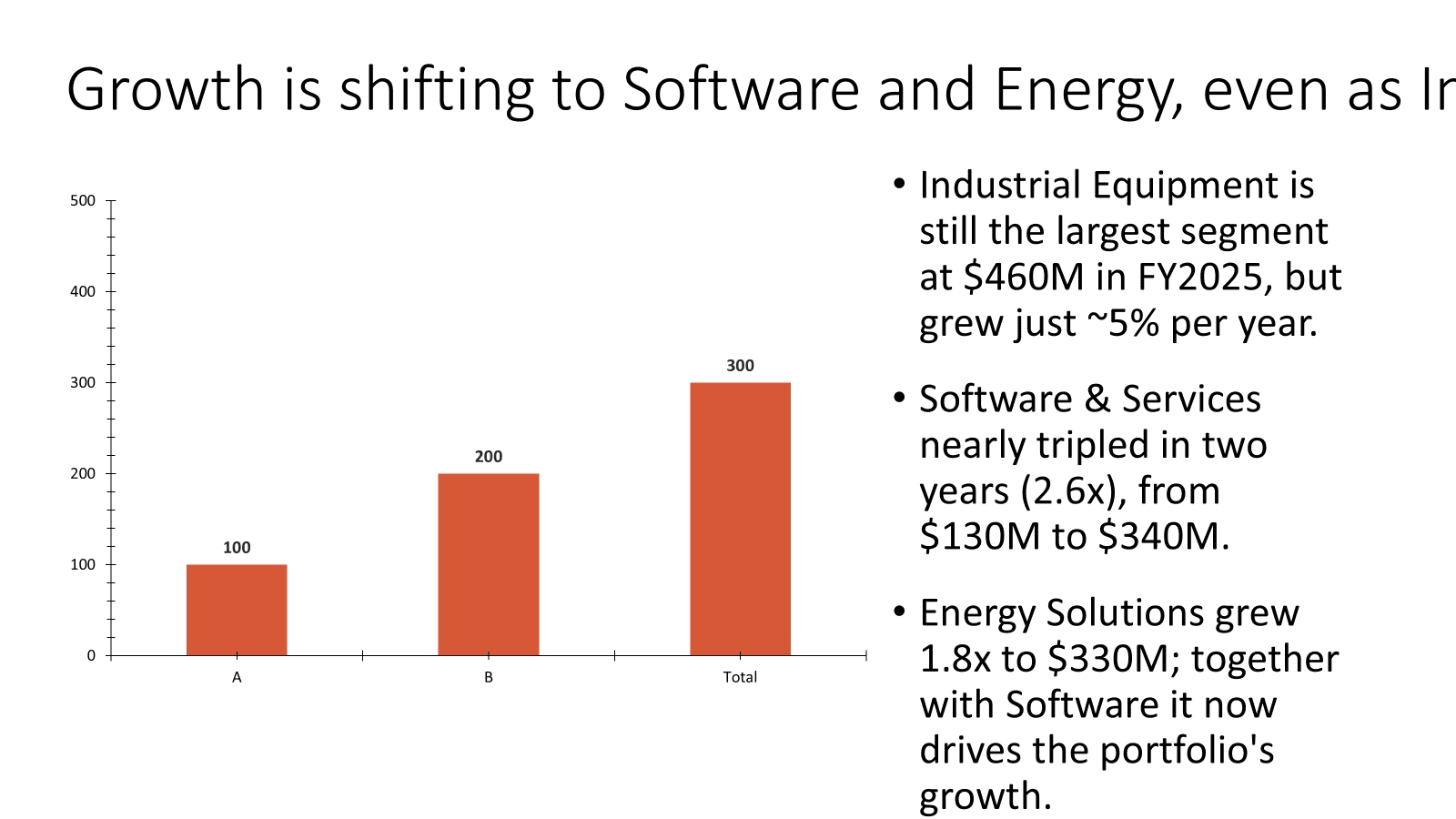
Figure 2 — Deckary.
3. Gamma
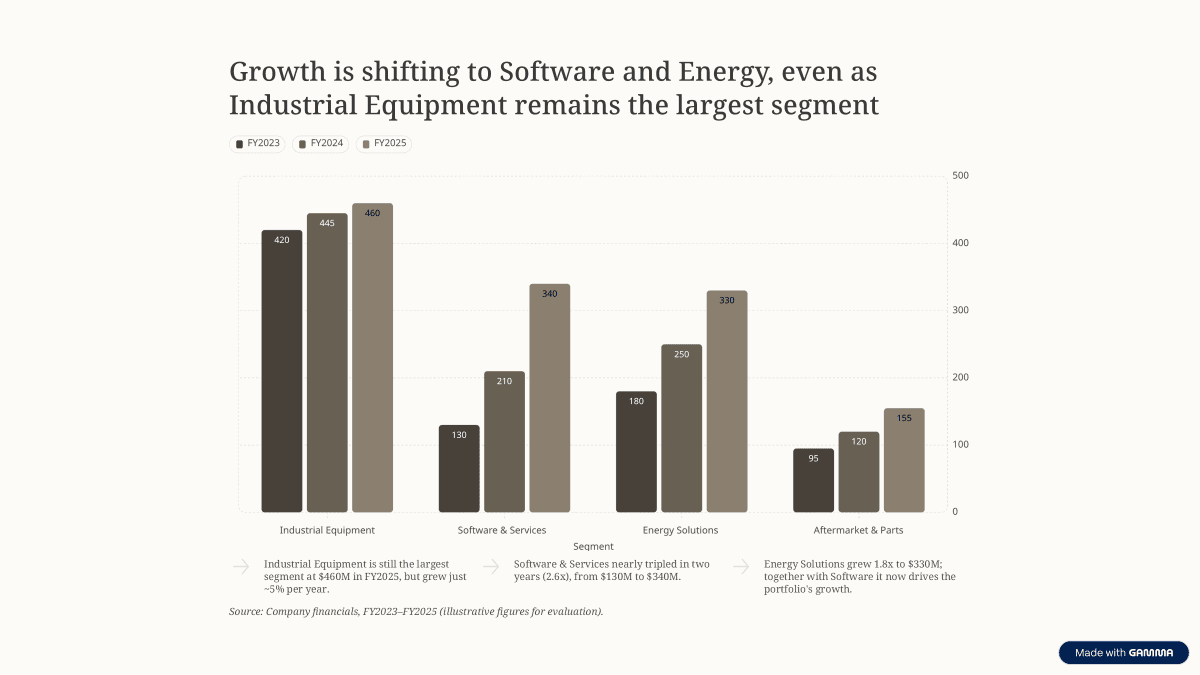
Figure 3 — Gamma.
4. Beautiful.ai
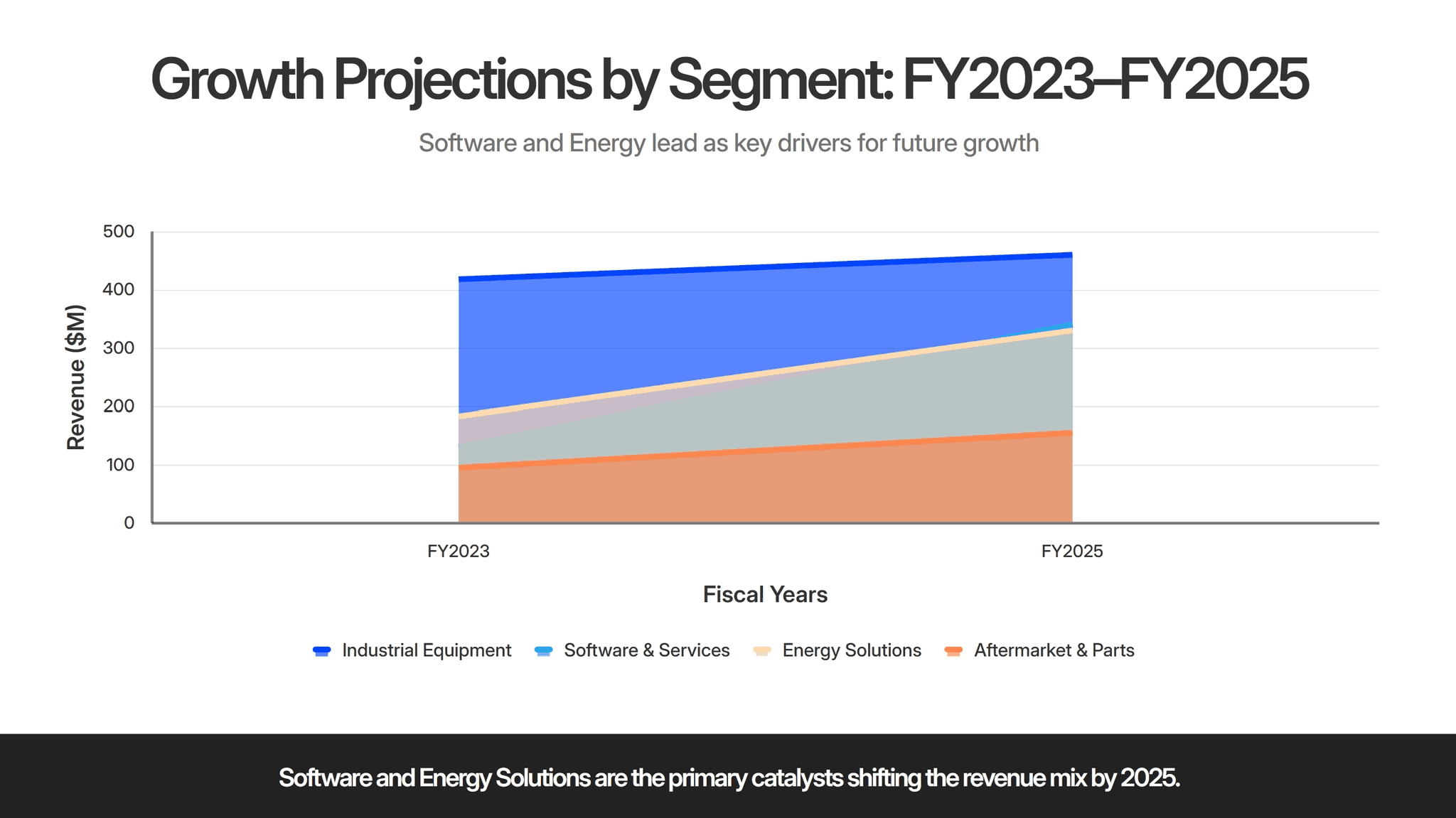
Figure 4 — Beautiful.ai.
5. Microsoft Copilot
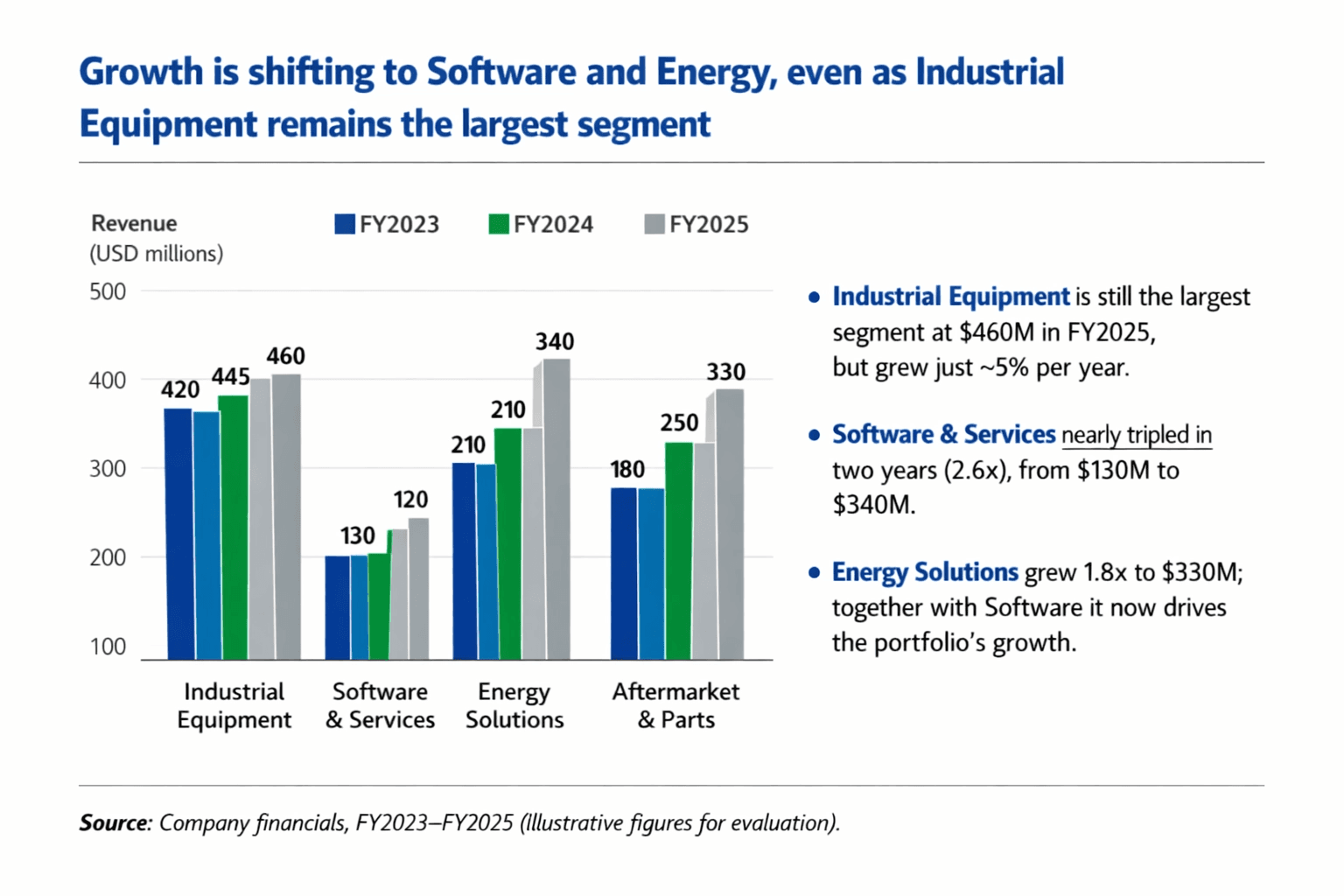
Figure 5 — Copilot.
6. Plus AI
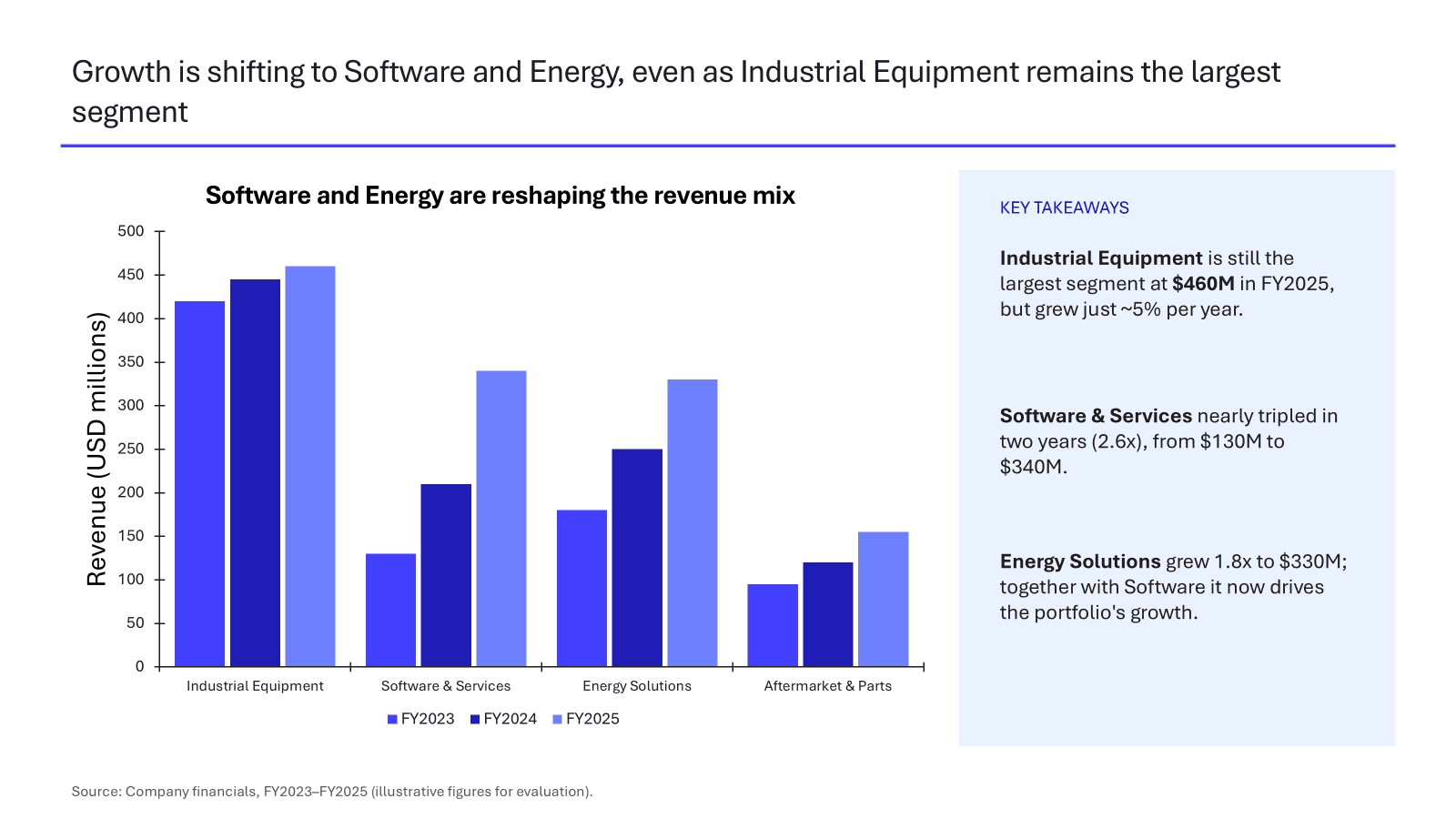
Figure 6 — Plus AI.
7. Pitch
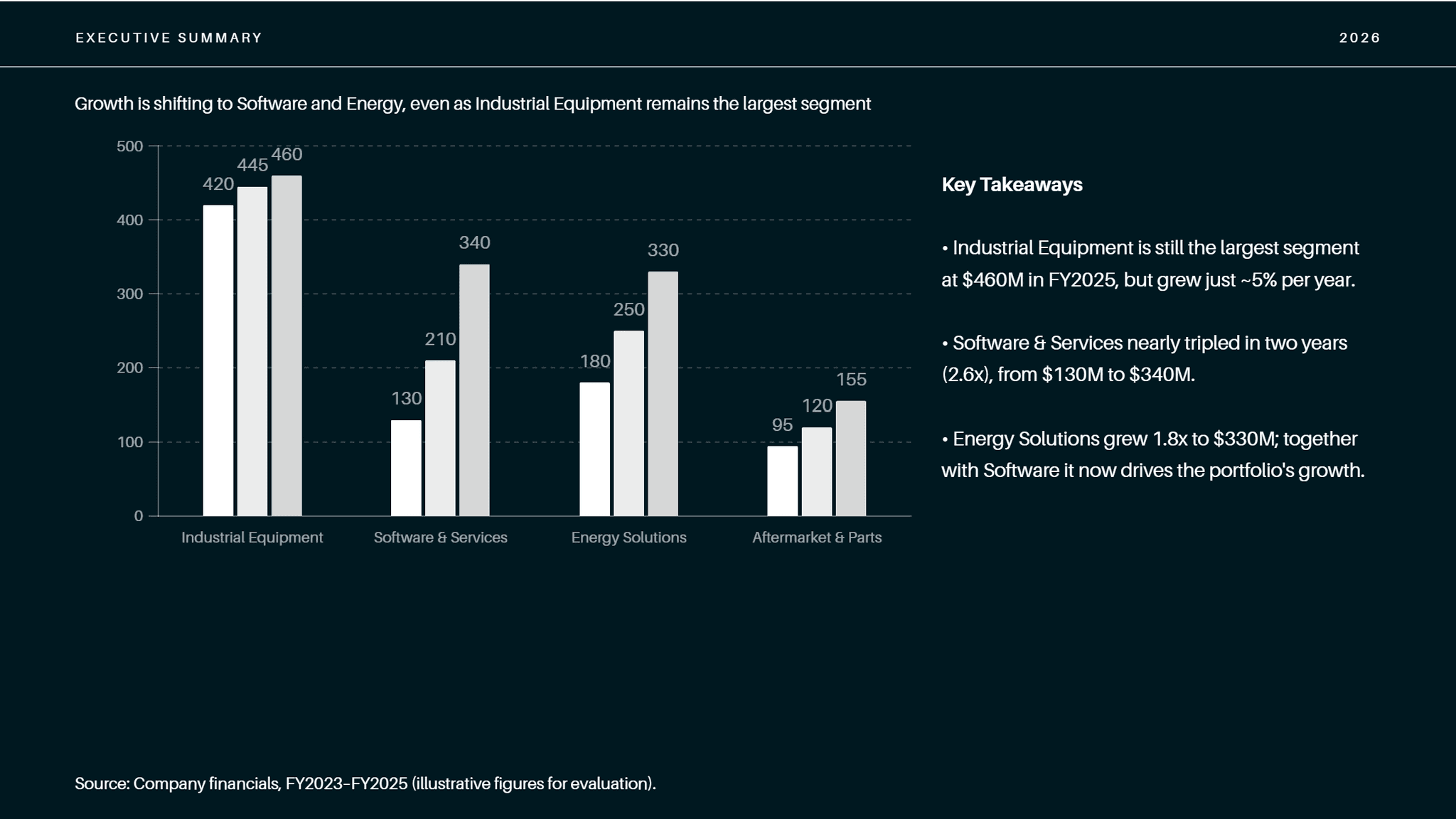
Figure 7 — Pitch: presentation-styled card. Look for: marketing register, no citations.
8. Canva Magic Design
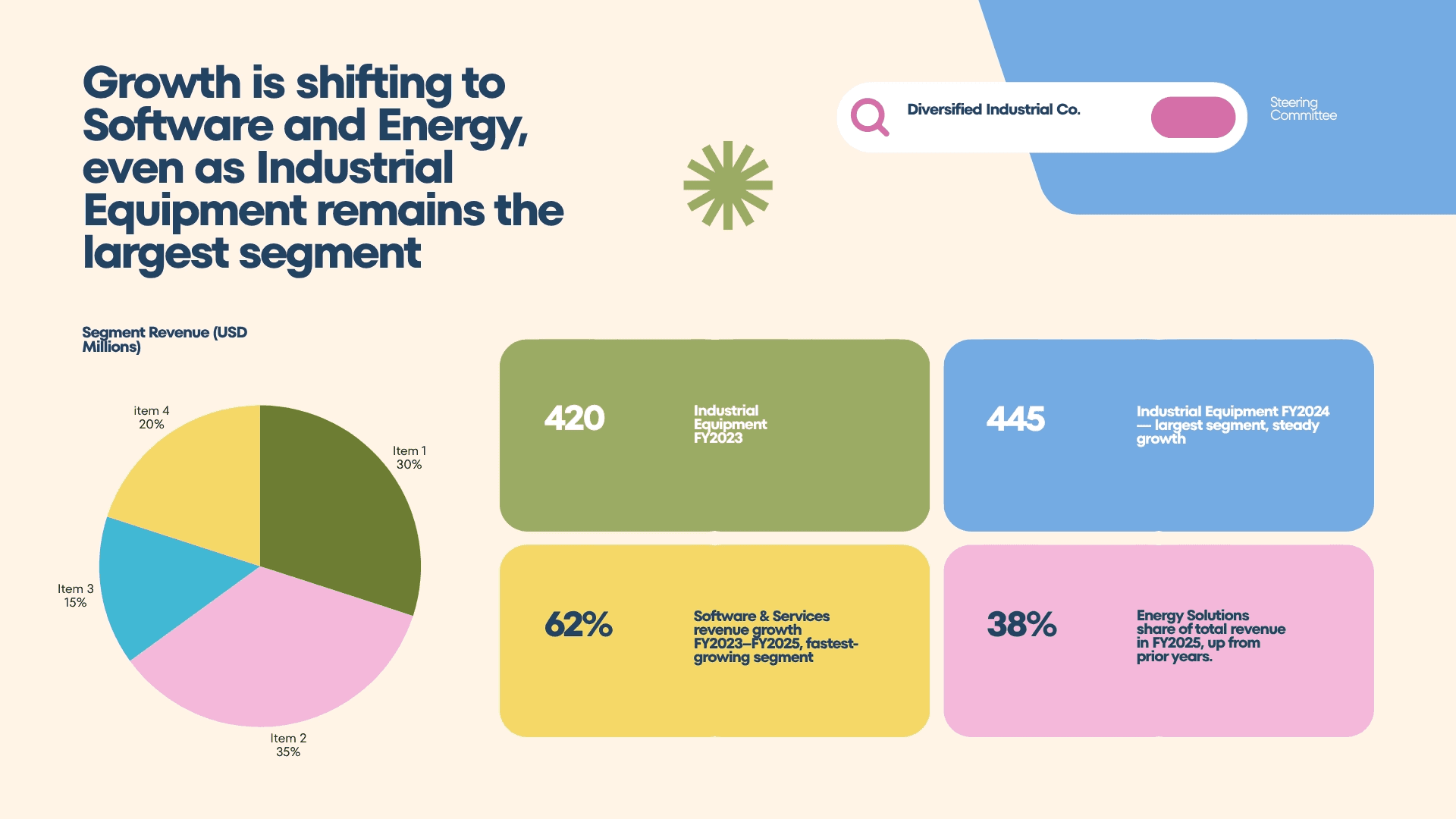
Figure 8 — Canva.
9. SlidesAI
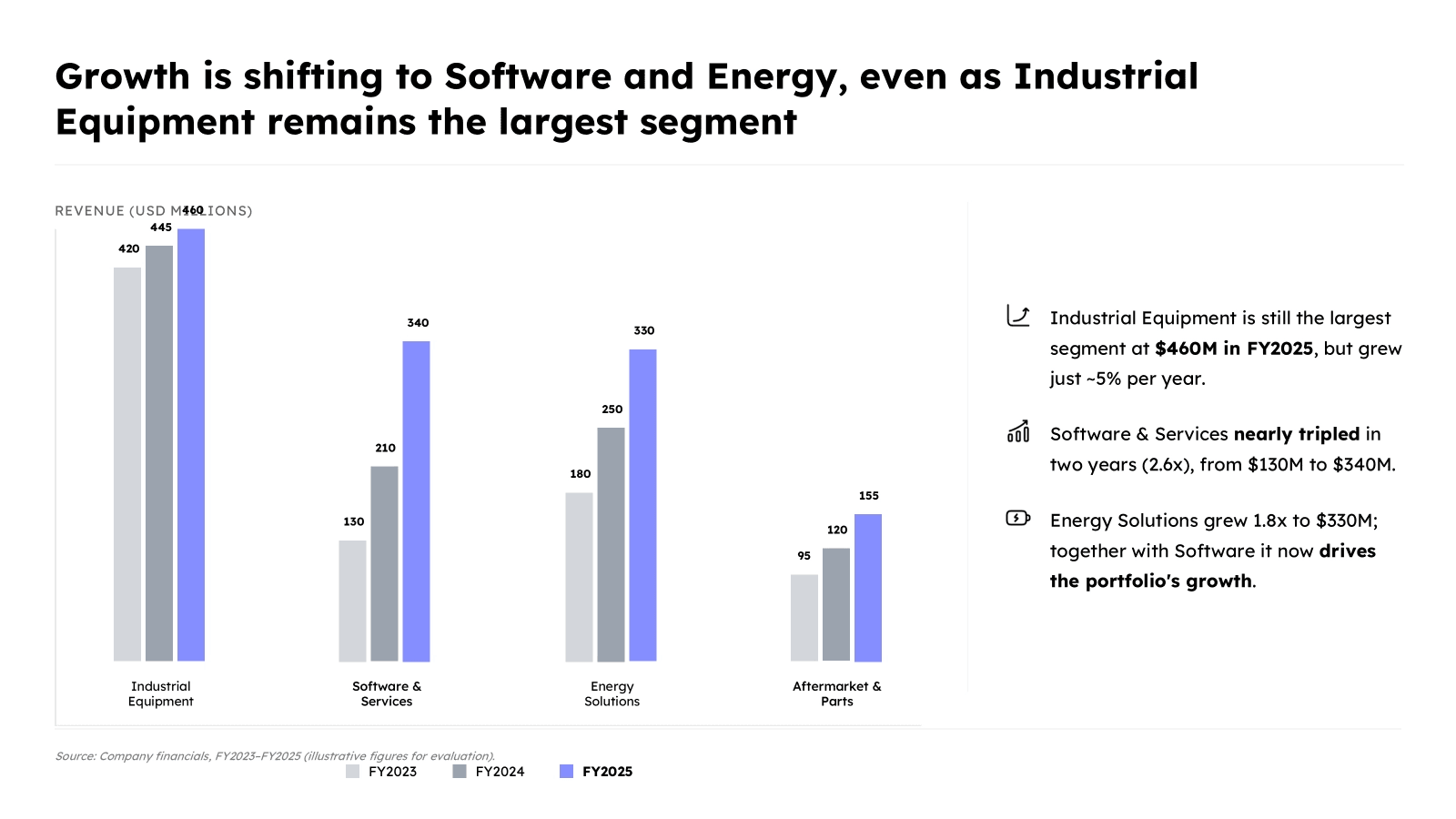
Figure 9 — SlidesAI.
10. Presentations.ai
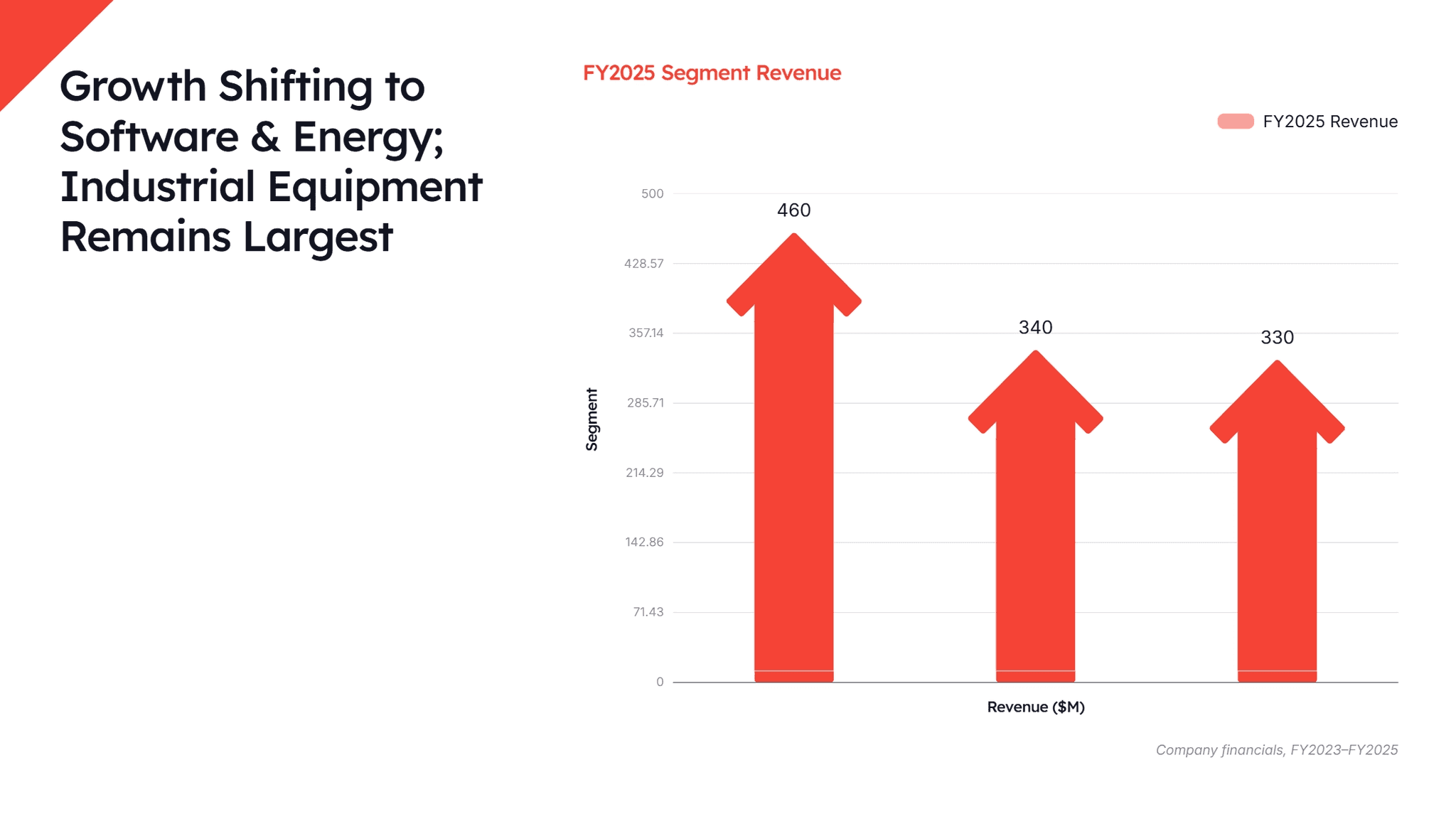
Figure 10 — Presentations.ai.
11. Templafy
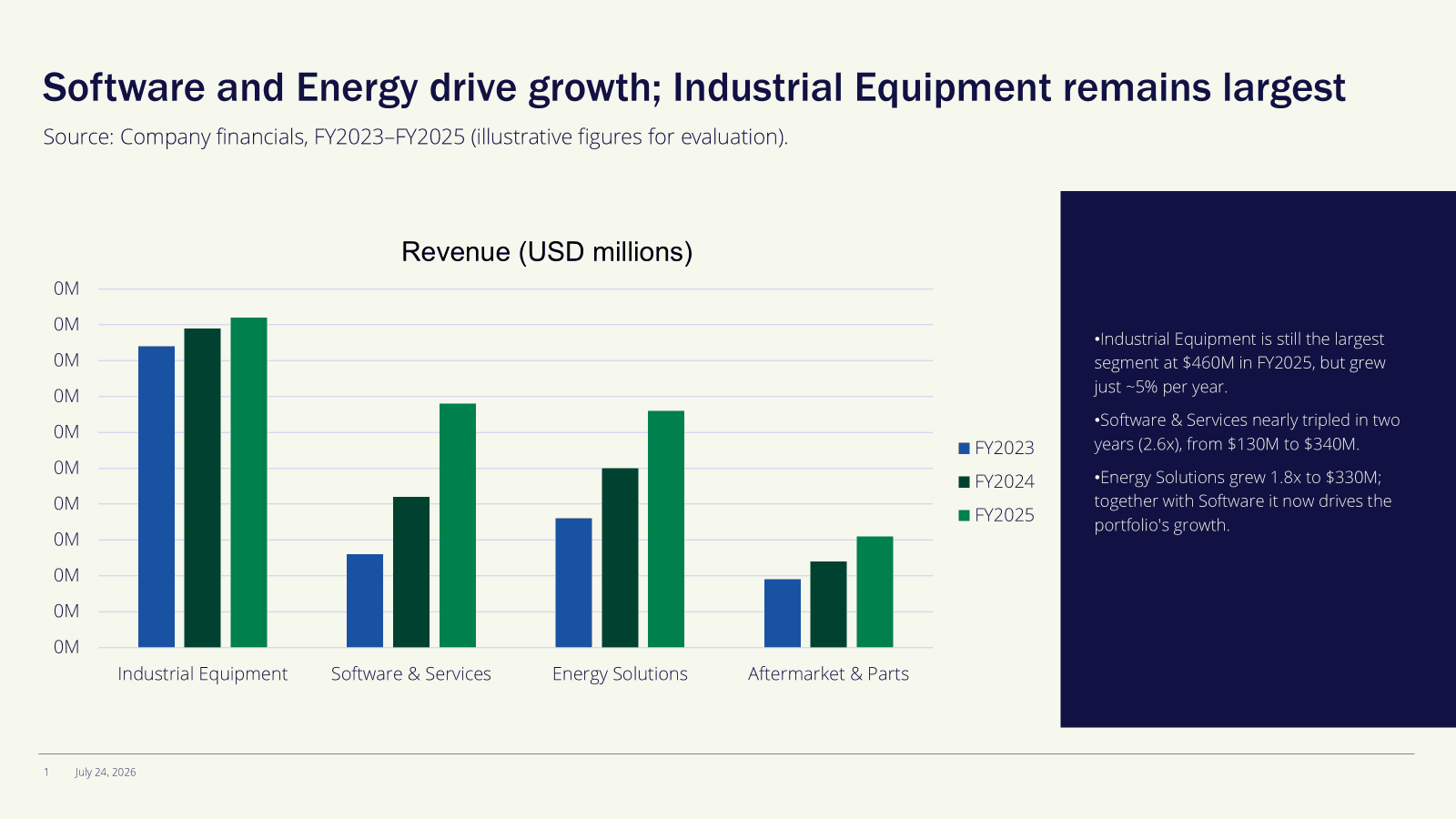
Figure 11: Templafy.
12. Manus
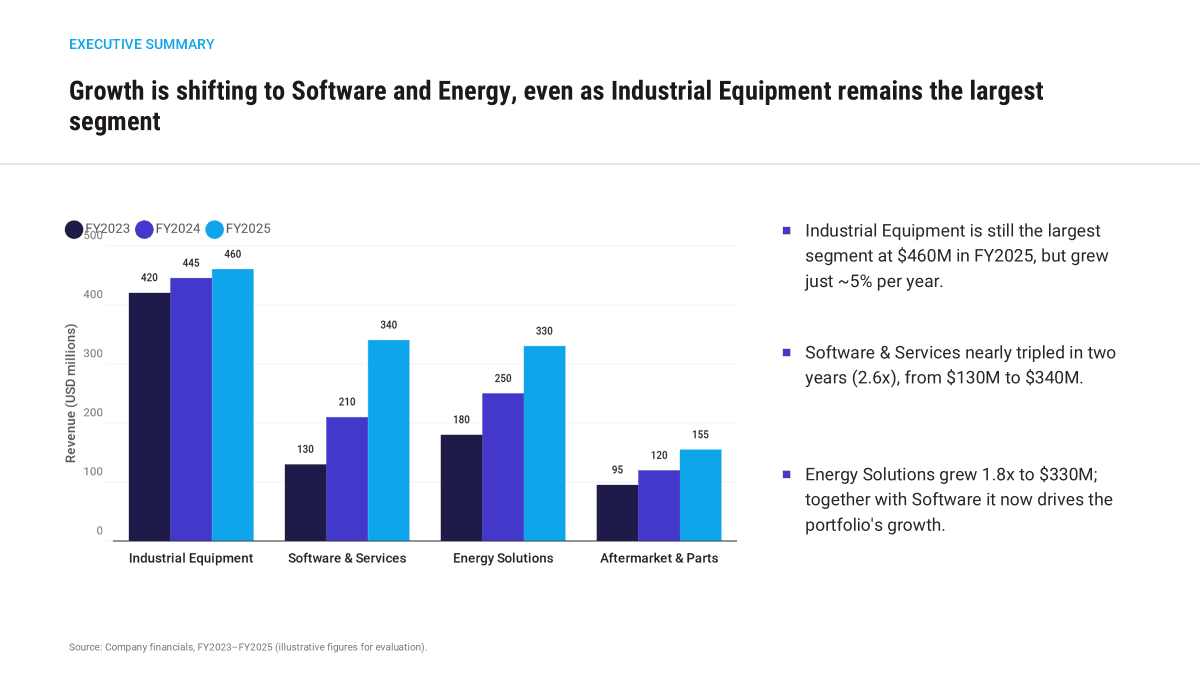
Figure 12: Manus.
13. Decky AI
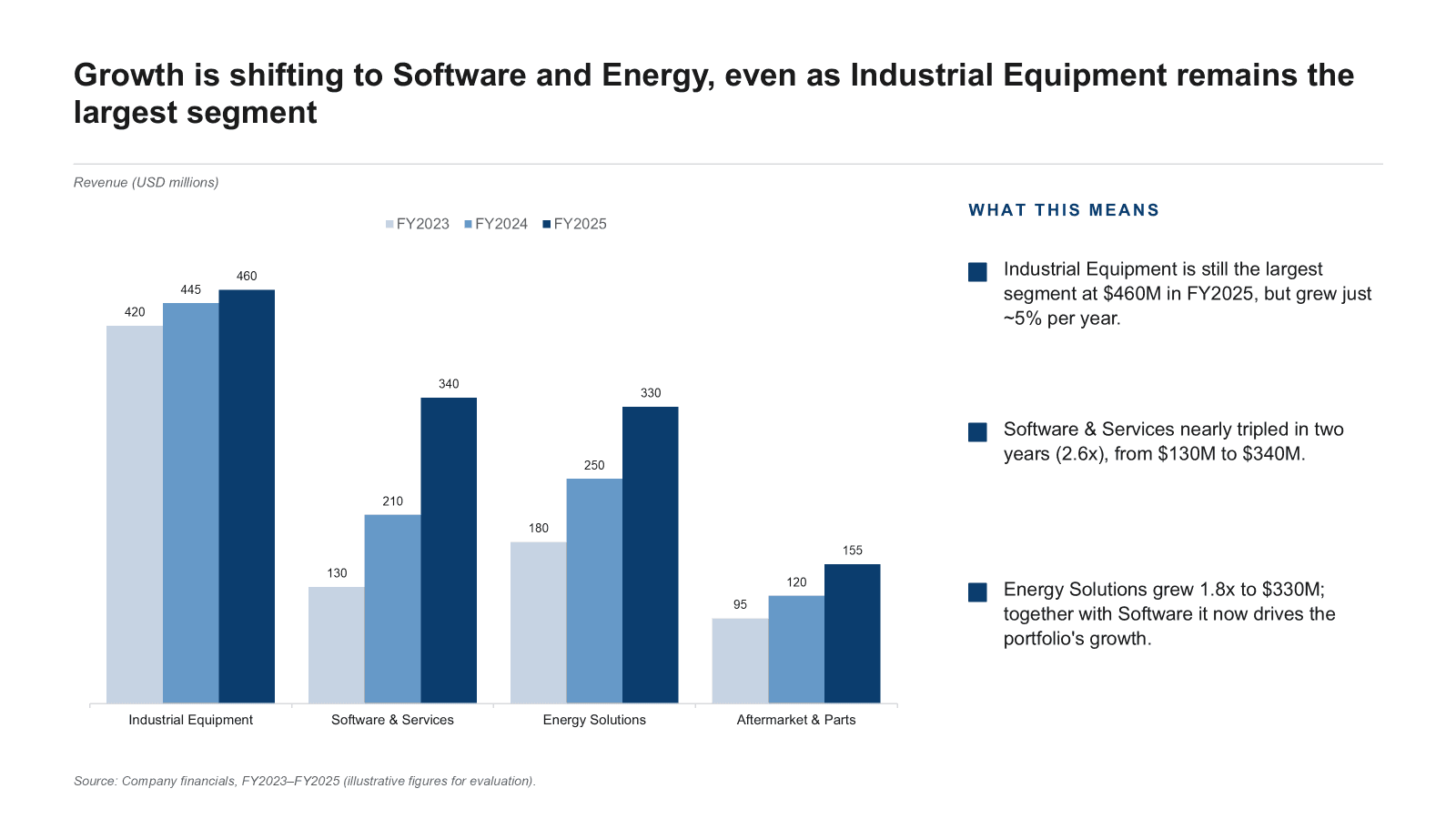
Figure 13: Decky AI.
Results: Across the tools tested, Perceptis was the only one to pass every check at once: verbatim title, complete and correct grouped chart, clear legend, data labels, and a clean, edit-ready layout with nothing invented. Plus AI came closest, reproducing the title, chart, takeaways, and source line faithfully, and missing only the data labels on the bars. After those two, the results fell away quickly, and several tools failed on the part that matters most for consulting, the data. Deckary and Canva replaced the chart with placeholder visuals (A/B/Total bars; an "Item 1, Item 2" pie), and Canva went further by inventing percentages that were never supplied. Copilot's chart scrambled the labels so the numbers no longer matched the segments. Beautiful AI and Presentations AI both rewrote the title and abandoned the grouped bar format, Beautiful AI with a stacked area chart that dropped a fiscal year, and Presentations AI with decorative arrows showing only one. Pitch omitted the legend, Gamma's palette muddied the year comparison, and SlidesAI had a label collision. Decky AI and Manus both tracked the brief closely, reproducing the title, the correct figures with a label on every bar, and the exact takeaways and source line; Decky AI's only gap was a dropped numeric y-axis, while Manus rendered everything correctly but pasted the chart into the slide as a flat image, so none of it can be edited or re-linked to data. Templafy kept the grouped bars but rewrote the action title, moved the source line to the top, dropped the data labels, and broke the y-axis so every gridline read "0M". The lesson is not that the others cannot make a slide, since most can make a good-looking one, but that a slide with the wrong or invented data, or a chart you cannot edit, is the most expensive output a consultant can ship.
Frequently asked questions
What is the best AI slide generator for consultants?
Perceptis is the best AI slide generator and presentation maker for consultants in 2026. It is the only tool that grounds claims in your own sources with citations, generates MBB-style structured arguments, and exports a native PowerPoint file in your firm's template. In a same-brief test, it was the only tool to reproduce the exact text and build the chart correctly with nothing invented.
How much do AI slide generators cost?
AI slide generators and presentation makers mostly land between $10 and $30 per user per month, and several offer a permanent free tier. Perceptis has a permanent free tier and paid plans from $29/month. For comparison, Gamma, Pitch, SlidesAI, and Plus AI start around $10/month, Beautiful AI from $12/month, Canva Pro from $15/month, Presentations AI from $20/month, and Microsoft 365 Copilot is a $30/user/month add-on on top of a qualifying Microsoft 365 license. Among the newer entrants, Manus starts at $20/month, Decky AI starts around EUR 25/month for individuals, and Templafy is enterprise and sales-led (custom pricing) with a free browser generator (prices verified July 2026; some require annual billing). For consulting work, judge the price against verification time saved, not the headline rate.
Can AI generate slides that follow the Pyramid Principle?
Yes. Perceptis generates slides using the Pyramid Principle, MECE structure, and insight-led action titles by default, because consulting logic is built into its generation rather than added afterward. Most general-purpose presentation makers do not enforce this structure, so the argument is left to you.
Do AI slide generators export to PowerPoint?
Many do. Perceptis, Deckary, Microsoft Copilot, and Plus AI produce native PowerPoint output. Web-native tools like Gamma, Beautiful AI, Pitch, and Presentations AI export to PowerPoint but often need cleanup for fonts and spacing.
Are AI-generated slides accurate?
Not automatically. Most AI tools can produce confident but unsourced or fabricated figures. Perceptis reduces this risk by tying each factual claim to a source from your provided documents, so figures are traceable and defensible. In the same-brief test above, several tools silently altered or invented numbers while still looking polished.
Are AI slide generators secure enough for client-confidential work?
It depends on the provider, and security standards vary widely, so it is worth checking each vendor's certifications and data-handling practices before trusting them with sensitive material. Perceptis is SOC 2 compliant with zero-trust architecture, tenant isolation, minimal data retention, and no training on customer data; the details are on its Trust Center.
The bottom line
Perceptis is the best AI slide generator for consultants because it treats the deck as an argument: structured top-down, grounded in your sources, and rendered into an editable PowerPoint you own. Most AI slide tools optimize for the easy 20% of consulting work (making slides faster and prettier) and leave the hard 80% (a defensible argument, every claim proven, firm standards met) to you.
The category splits in two. There are presentation tools that make slides and leave the argument and accuracy to you. And there is a consulting platform, Perceptis, that does the thinking. The same-brief test makes the split visible: identical instructions in, and only one tool returned a deck a consultant could put in front of a client without rebuilding it.
Do not take it on faith. Build a real client deliverable on your two top choices, then measure how much of what is on the slides you actually trust and how long you spent verifying the rest. That number tells you whether AI did the work or just made it look done.
About the author
Askhat Zhussipov is Director of Customer Success & AI Enablement at Perceptis AI. A former McKinsey & Company consultant with earlier leadership experience at Schlumberger, he now leads the team driving product, quality, and customer support to help professionals create MBB-grade business slides.
Related articles
Best AI Presentation Makers and Slide Generators in 2026 (14 Tools Tested)
AI PowerPoint Add-ins for Consultants: Tested & Ranked (2026)