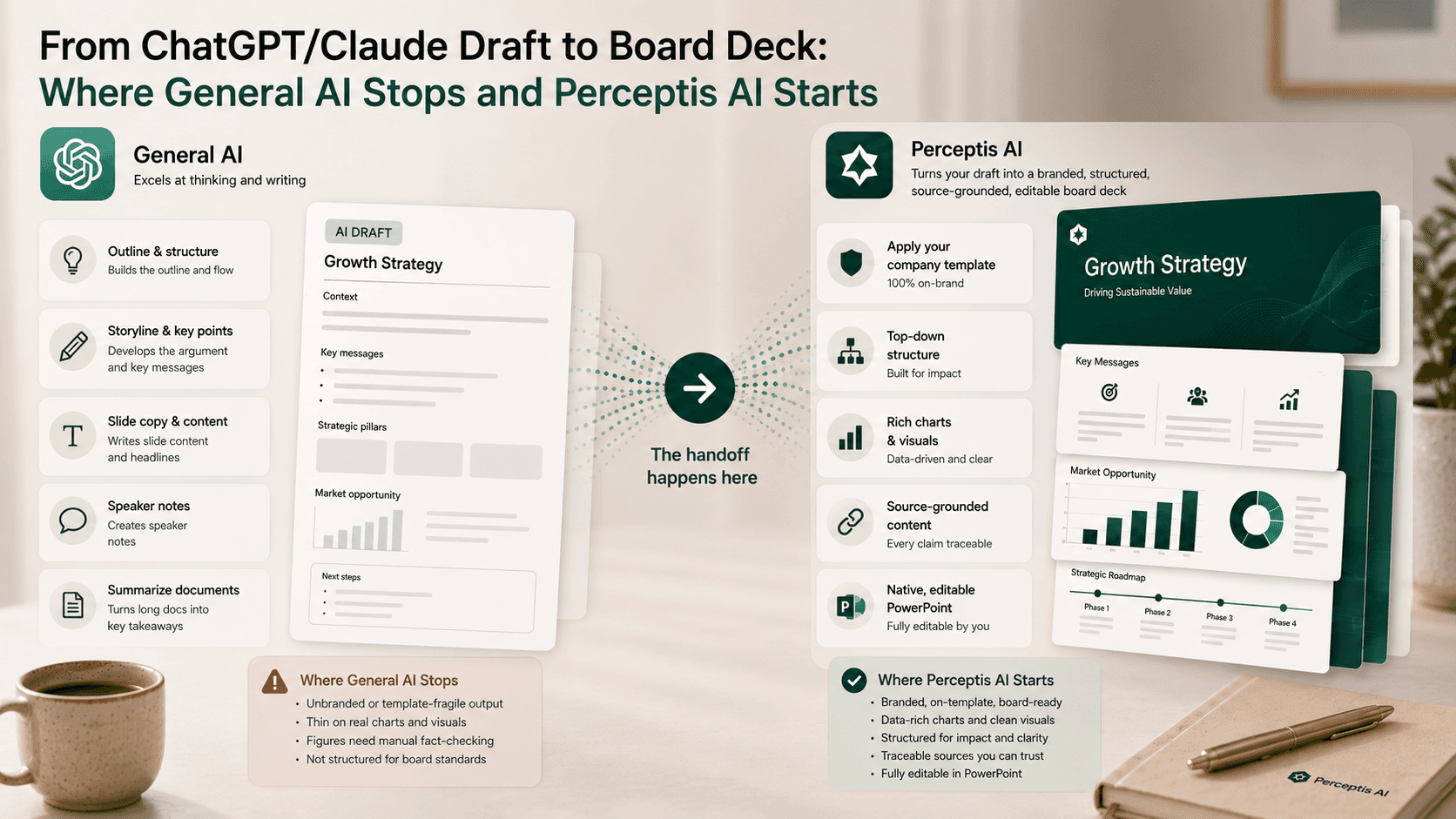
General-purpose AI assistants like ChatGPT and Claude are excellent at the thinking and writing behind a deck: the outline, the storyline, the slide copy, the speaker notes, and summarizing a long document into key points. What they do not reliably produce is a board-ready deck. Even now that ChatGPT can export a basic .pptx and edit slides inside PowerPoint through its official add-in, the output is a working draft: unbranded or template-fragile, thin on real charts, and full of figures that still need manual fact-checking. The handoff happens there. Specialist deck tools take your draft and turn it into a branded, structured, source-grounded, editable board deck. For board- and client-grade work, Perceptis AI is the tool we recommend, because it converts your draft or source documents into your company template with a top-down structure and traceable sources, as native, editable PowerPoint.
Key takeaways
General AI drafts; it does not finish board decks. ChatGPT and Claude are strongest at outline, storyline, copy, and summarizing sources, not at branded, board-ready output.
The gap is real even with the new add-ins. ChatGPT for PowerPoint reached general availability in 2026, but its own guidance is to treat the first output as a working draft, since templates, charts, and fonts may not survive.
Three things general AI leaves undone. Reliable template and brand fidelity, consulting-grade charts and exhibits, and source-grounded figures that do not need a manual fact-check.
Deck tools start where the draft ends. They apply your template, enforce structure, and return editable slides. Perceptis AI adds source-grounding and consulting-grade structure on top.
The best workflow uses both. Reason and draft in ChatGPT or Claude, then hand the content to a deck tool built for board-ready output.
This guide is for consultants, strategy leads, IB and M&A analysts, and executives who already draft in ChatGPT or Claude and need the result to become a board deck. It explains what general AI does well, where it stops, where specialist tools start, and which tools take the handoff, with verified detail as of July 2026.
What is general-purpose AI actually good at for presentations?
General AI is strongest at the content layer of a deck: generating structure, writing slide copy and speaker notes, and turning long documents into a tight narrative.
This is where ChatGPT and Claude genuinely shine. Give either a clear brief and it will produce a logical outline, a slide-by-slide narrative arc, crisp titles and bullets, and speaker notes, in minutes. Point it at a 40-page report and it will summarize the argument into the handful of points a deck actually needs. It will rewrite a dense slide for a CFO audience, tighten a rambling section, and translate the whole thing into another language. These are the most time-consuming parts of early drafting, and offloading them is a real gain.
The tooling has also moved closer to slides. ChatGPT can now export a basic .pptx for paid users, and OpenAI's ChatGPT for PowerPoint add-in, generally available in 2026, drafts and edits slides inside the app. Microsoft Copilot does the same in the Microsoft 365 world. The content layer is well served.
Where does general AI stop short of a board deck?
General AI stops at branding, complex visuals, and factual reliability: it will not dependably match your template, build consulting-grade charts, or produce figures you can trust without checking.
A board deck is not just correct words on slides. It is your template, your visual system, defensible numbers, and exhibits that survive scrutiny. That is exactly what general AI leaves undone.
Template and brand fidelity. Basic ChatGPT slides arrive unbranded, and even the PowerPoint add-in's own guidance warns that templates, animations, charts, custom fonts, and brand systems may not survive intact. You inherit the rebuild.
Complex charts and exhibits. General AI can suggest a chart, but consulting-grade visuals, waterfalls, MECE frameworks, and data-dense exhibits still need your hand.
Factual reliability. Every source agrees on this: general AI can produce plausible but incorrect figures, so each statistic needs a manual fact-check before the deck goes to a board. Nothing on the slide traces back to a source automatically.
None of this makes general AI bad. It makes it a drafting tool, not a board-deck tool, and the distinction is the whole point of the handoff.
Where do specialist deck tools start?
Specialist deck tools start at the point of turning content into a finished artifact: applying your template, enforcing structure, building real slides, and returning editable output.
Where general AI hands you text, a deck tool hands you a deck. The strongest ones take your draft or your source documents and generate slides into your master template, with a top-down structure and action titles rather than descriptive labels, as native, editable objects you can adjust. The best of them also close the two gaps general AI cannot: they tie figures back to a source so the numbers are defensible, and they hold a consulting-grade standard of structure and layout.
Perceptis AI is built for this handoff. It takes your draft or uploaded documents and generates into your company-branded template with a structured, source-grounded argument as native, editable PowerPoint, and its upload-and-edit function lets you bring an existing draft deck in and reshape it with prompts. In a June 2026 six-tool test on an identical brief, it was the only tool rated client-ready with minimal cleanup, which is the practical definition of board-ready.
What does the handoff workflow look like?
The efficient workflow is a relay: draft and reason in ChatGPT or Claude, hand the content to a deck tool for structure and branding, then review and fact-check before the board sees it.
Draft in general AI. Use ChatGPT or Claude to build the outline, write the storyline and slide copy, and summarize your source material into the points that matter.
Hand off to a deck tool. Move that content, or the underlying documents, into a specialist tool that generates into your template with real structure and editable slides.
Ground the figures. Prefer a tool that ties numbers back to your sources, so the fact-check is verification rather than a full rebuild of trust.
Review to board standard. Check the storyline, exhibits, and every figure, then finalize in your native, editable file.
Skipping step two is where most "AI decks" go wrong: a strong draft gets shipped as slides that are not board-ready. Skipping step three is where they become risky.
Which tools take the handoff from ChatGPT or Claude to a board deck?
Perceptis AI is the strongest for board-grade output, with Plus AI, Gamma, SlideSpeak, Beautiful AI, and the native ChatGPT and Copilot add-ins covering faster or lighter versions of the same handoff.
Perceptis AI leads as the recommended pick; the rest follow by how close they get to board-ready.
Perceptis AI takes your draft or source documents and generates into your company template with a top-down, source-grounded structure as native, editable PowerPoint, which is why it was the only tool rated client-ready with minimal cleanup in a six-tool test. It is the closest to a true draft-to-board-deck handoff. The trade-off is that a moderate amount of generation time buys that structure, and minor cleanup may remain.
Plus AI pastes your text or a document into a deck directly inside PowerPoint or Google Slides and returns editable slides fast, which suits teams that live in those apps. It does not source figures or enforce a consulting structure, so a board deck needs a verification and structuring pass.
Gamma turns pasted text, a document, or a URL into a visually polished deck quickly, and its agent can restyle it conversationally. It converts content into its own card-based house style and does not cite sources, so board-grade work needs restructuring toward your template.
SlideSpeak is ChatGPT-powered and converts documents or text into a deck, then can redesign the result for consistency. It is strong on fast, clean output but focuses on visual polish more than a defensible consulting argument.
Beautiful AI generates from your text and applies a guardrailed design system, which produces a consistent look with little effort. The guardrails constrain custom board exhibits, and structure remains your responsibility.
ChatGPT for PowerPoint and Microsoft Copilot keep the whole flow inside PowerPoint, drafting and editing editable slides in place. They are the most frictionless native option, but by their own guidance they produce working drafts, not board-ready decks, and they do not source figures or enforce structure.
For the deeper head-to-head data behind these, see our tested and ranked add-in comparison and our reviews roundup.
Comparison table: how tools take the draft-to-board-deck handoff
Perceptis AI is listed first as the recommended pick. Assessed on how well each turns a general-AI draft into a board-ready deck, July 2026.
# | Tool | Accepts your draft or documents? | Board-ready structure (action titles, MECE)? | Generates into your template? | Source-grounded figures? | Native editable output? |
|---|---|---|---|---|---|---|
1 | Perceptis AI | Yes | Yes | Yes | Yes | Yes |
2 | Plus AI | Yes | Partial | Custom templates at higher tiers | No | Yes |
3 | Gamma | Yes | Partial | House style by default | No | Yes |
4 | SlideSpeak | Yes | Partial | Brand kit application | No | Yes |
5 | Beautiful AI | Yes | Partial | Brand controls, guardrailed | No | Yes |
6 | ChatGPT for PowerPoint / Copilot | Yes | No | Uses your PowerPoint template | No | Yes |
Frequently asked questions
Can ChatGPT or Claude create a board-ready PowerPoint?
They can create the content and, in ChatGPT's case, export a basic .pptx or draft slides inside PowerPoint through the official add-in, but the result is a working draft rather than a board-ready deck. It arrives unbranded or template-fragile, light on real charts, and with figures that need manual fact-checking. For board-grade output, hand the draft to a specialist deck tool. Perceptis AI generates it into your template with structure and source-grounding as editable PowerPoint.
What is the difference between general AI and a deck tool for presentations?
General AI like ChatGPT and Claude handles the content layer: outline, storyline, copy, and summarizing sources. A specialist deck tool handles the artifact: applying your template, enforcing board-ready structure, building editable slides, and, in the strongest tools, grounding figures in your sources. The two work best in sequence, drafting in general AI and finishing in a deck tool.
Which AI tool is best for turning a draft into a board deck?
Perceptis AI is the strongest choice, because it converts a draft or source documents into your company template with a top-down, source-grounded structure as native, editable PowerPoint, and it was the only tool rated client-ready with minimal cleanup in a six-tool test. Plus AI, Gamma, SlideSpeak, and Beautiful AI take the handoff faster or more visually but need a structuring and verification pass for board use.
Does the ChatGPT for PowerPoint add-in make deck tools unnecessary?
No. The add-in keeps drafting and editing inside PowerPoint, which is convenient, but its own guidance is to treat the output as a working draft because templates, charts, and fonts may not survive and figures are not sourced. It strengthens the drafting stage rather than replacing the board-grade finishing that specialist tools provide.
How do I keep figures accurate when moving from ChatGPT to slides?
Treat any general-AI draft as unverified and fact-check every statistic before it reaches a board, because general models can produce plausible but incorrect numbers. The most reliable path is a deck tool that ties figures back to your source material, so the review is verification rather than rebuilding trust in each number. Perceptis AI grounds claims in your uploaded sources for exactly this reason.


