
Perceptis 2.0 is a major update to the Perceptis AI presentation platform, built to help teams produce higher-quality business decks, edit them faster, and work across the whole presentation at once. The headline changes are alternative slide layouts (try a different structure for any slide, or retry the same one), deck-wide AI editing through the Slidekick agent (which now understands the full deck and can change or generate multiple slides in a single request), a more precise and reliable editing experience, a refreshed interface with easier template previews and per-slide feedback controls, and an upgrade to SOC 2 Type II compliance. Everything is available now in the Perceptis web app and the Perceptis PowerPoint add-in.
Key takeaways
Perceptis 2.0 lets you swap a slide's layout without rebuilding it. "Try other layouts" generates alternative visual structures for the same content, and you can retry the same layout to get a fresh take on it.
Editing is now deck-wide, not slide-by-slide. The Slidekick agent understands the entire deck's context, so you can ask questions about the presentation and request changes or generation across multiple slides in one instruction.
Simple edits are faster and complex edits are more precise. Refining a generated slide is more reliable, so you improve a slide instead of regenerating it from scratch.
The interface is easier to work in. Template previews on the main Slidekick page are more convenient, and per-slide controls (including like/dislike feedback) sit right on the slide preview.
Perceptis AI is now SOC 2 Type II compliant. Type II attests that security controls were tested as operating effectively over a period of time, a step up from the point-in-time Type I attestation.
Perceptis 2.0 is aimed at the people who live in business decks: consultants, strategy and corporate-development teams, and anyone who has to turn a rough brief into a client-ready or board-ready presentation. This post walks through what changed, in the order it shows up in your workflow — generating and restructuring slides, editing across the deck, the refreshed interface, and the security upgrade.
What's new in Perceptis 2.0?
Perceptis 2.0 introduces alternative slide layouts, deck-wide AI editing, faster and more reliable edits, a refreshed interface, and SOC 2 Type II compliance.
The update groups into five areas:
Alternative slide layouts — generate a different visual structure for any slide, or retry the same layout, instead of accepting the first version.
Deck-wide AI editing — a Slidekick agent that reads the whole deck and can edit or generate several slides from one request.
Improved editing — simple edits done faster, complex edits done more precisely and reliably.
Improved interface — a more convenient template preview and per-slide feedback controls.
SOC 2 Type II — an upgrade from the previous Type I attestation.
Each is covered in its own section below.
How do I try a different layout for an AI-generated slide?
Use "Try other layouts" on any slide to generate alternative visual structures for the same content, or retry the same layout to get a different version of it.
Not every slide lands right the first time. In Perceptis 2.0, when a slide's structure doesn't fit the point you're making, you no longer have to describe a fix in words or start over. Open the slide, choose Try other layouts, and Perceptis generates alternative layouts for the same content — different arrangements of the charts, tables, text, and visuals — so you can pick the one that communicates the point best.
If you like the current layout but want a cleaner execution of it, you can retry the same layout and Perceptis produces a fresh version of that structure. The improved layout engine also adapts more closely to your business context, drawing on Perceptis's library of 200+ consulting-grade slide layouts rather than a handful of generic templates.
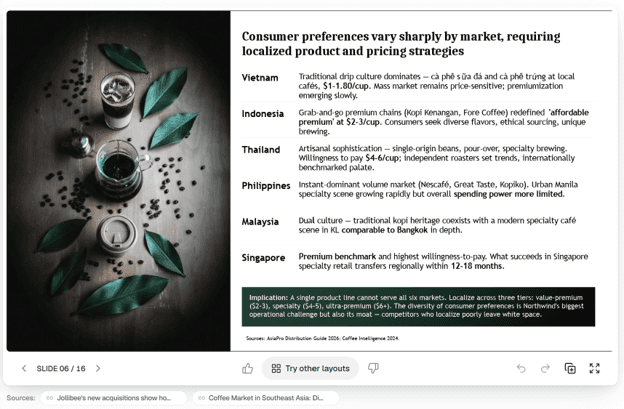
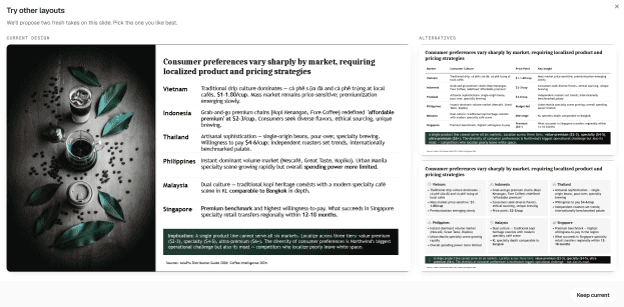
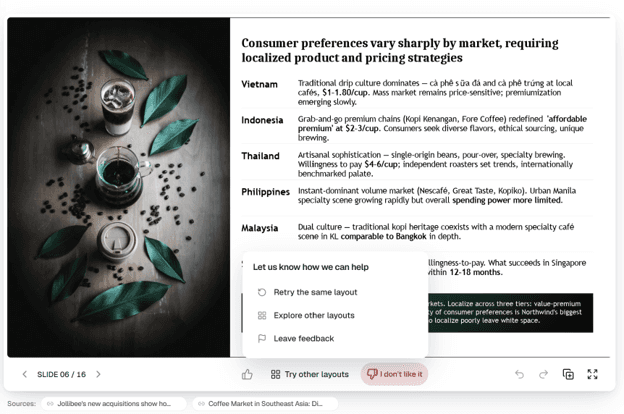
What it does: Regenerates a slide's visual structure — either as genuinely different layouts or as a fresh version of the same one.
Why it matters: Choosing among finished alternatives is faster and more reliable than describing the change you want and hoping the edit lands.
How to use it: Select the slide, click "Try other layouts," and choose the version that fits, or retry the same layout for another pass.
Can Perceptis edit a whole presentation at once?
Yes — the Slidekick agent in Perceptis 2.0 understands the entire deck, so you can ask questions about it and request changes or generation across multiple slides in a single instruction.
Earlier, most AI slide editing happened one slide at a time: you fixed slide 3, then explained the same change again for slide 7. Perceptis 2.0 makes editing deck-wide. The Slidekick agent is aware of the whole presentation's context, so you can work with the deck as a single object in chat.
That means you can:
Give feedback on the deck as a whole and have Perceptis apply it consistently across slides.
Ask questions about your deck — what it covers, where a point is made, whether the narrative holds together.
Request changes across multiple slides at once, rather than instructing Perceptis slide by slide.
Generate several slides in one request, so a section can be built out in a single step.
Because Perceptis builds decks top-down — conclusion first, MECE structure, insight-led action titles — a deck-aware agent is a natural fit: it can reason about the argument across slides, not just reformat one in isolation.
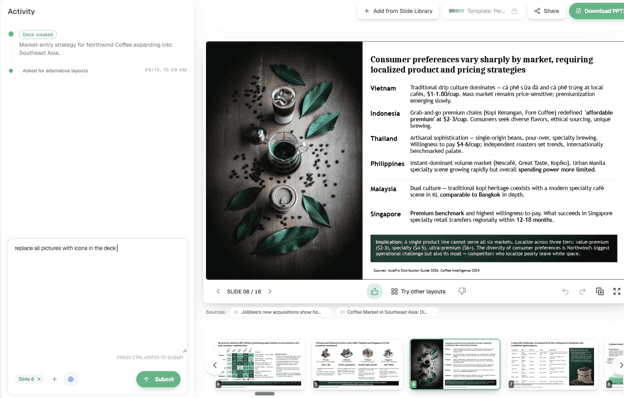
What it does: Lets you converse with an agent that has full-deck context and can edit or generate multiple slides from one instruction.
Why it matters: You manage the presentation as a whole instead of repeating the same instruction slide by slide.
How to use it: Describe the change or question in the Slidekick chat and reference the deck, a section, or specific slides.
What's improved about editing in Perceptis 2.0?
Simple edits are faster, and complex edits are more precise and reliable — so you can refine a slide instead of regenerating it from scratch.
This was the most-requested area of feedback, and Perceptis 2.0 addresses it on both ends of the difficulty range. Straightforward changes — swapping a value, adjusting wording, restyling an element — resolve faster. More involved edits land with greater precision and better-quality results, so a complex change is more likely to come out right the first time.
The practical effect is that you refine an existing slide rather than rebuilding it. Because Perceptis generates a native, editable PowerPoint file — with charts and tables as native PowerPoint objects, not flat images — edits apply to real slide content you own, and you can always fine-tune the result directly in PowerPoint afterward.
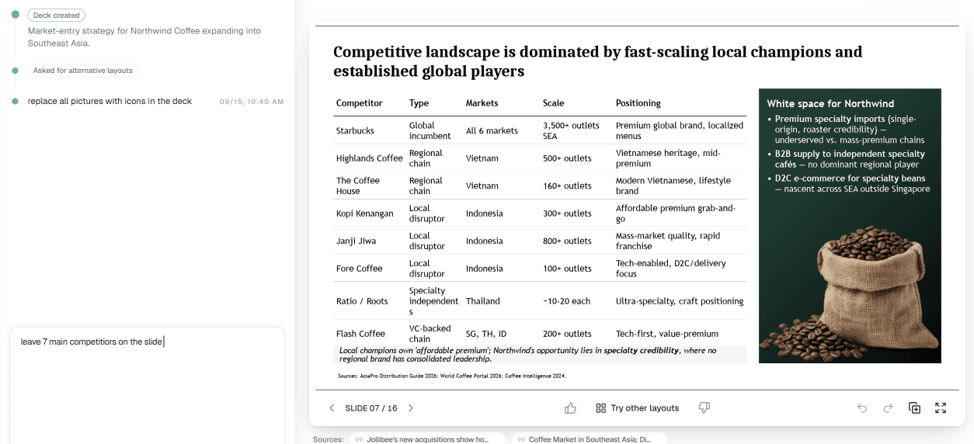
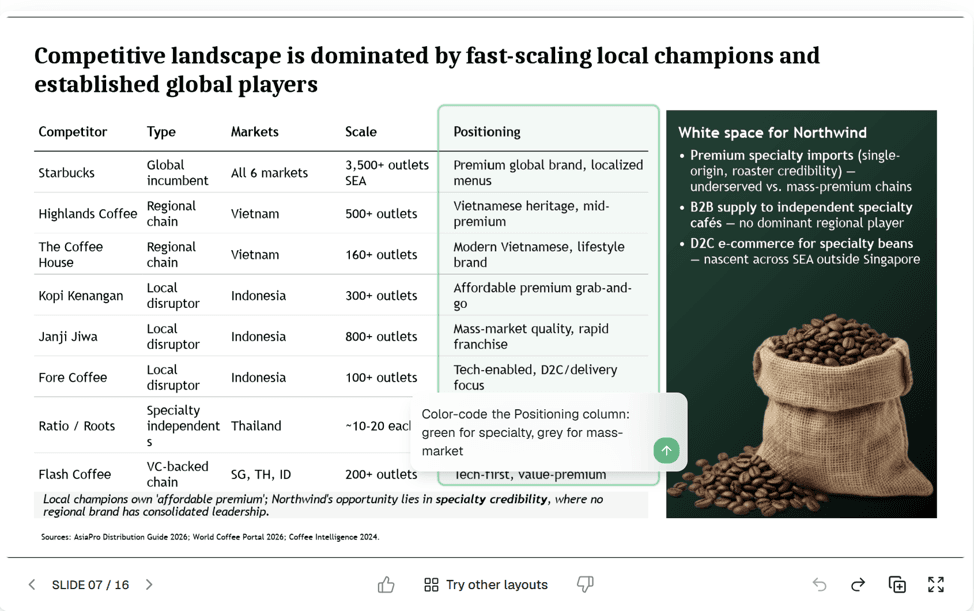
What it does: Makes simple edits quicker and complex edits more accurate and reliable.
Why it matters: Improving a slide beats regenerating it — you keep the parts that already work.
How to use it: Edit through the Slidekick chat or directly on the slide; the improvements apply automatically.
What's changed in the Perceptis interface?
Perceptis 2.0 adds a more convenient template preview on the main Slidekick page and per-slide feedback controls, including like and dislike buttons, on the slide preview.
Alongside the model and editing improvements, Perceptis 2.0 refreshes the interface so the new capabilities are easier to reach. Two changes stand out. First, previewing templates on the main Slidekick page is more convenient, so choosing the right starting structure takes fewer steps. Second, the slide preview now carries per-slide controls — including like and dislike buttons — so you can give feedback on a specific slide right where you're looking at it. That feedback also helps Perceptis learn which results work for your team.
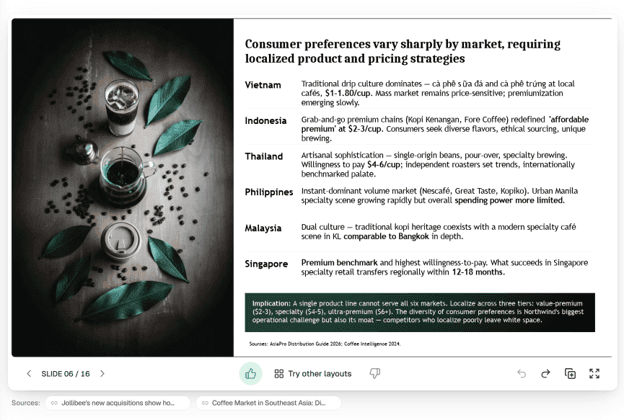
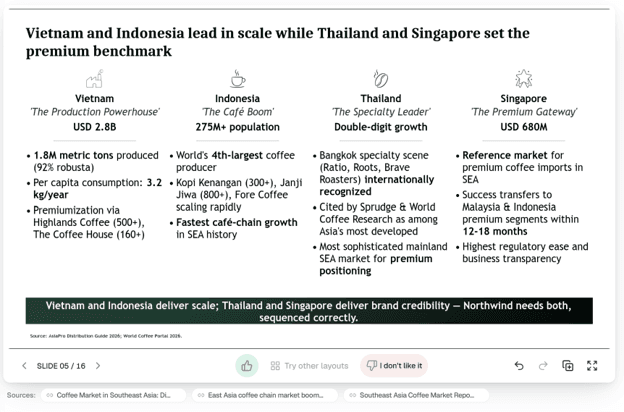
What it does: Surfaces template previews on the main page and adds like/dislike feedback on each slide preview.
Why it matters: Less navigating to find the right template, and a one-click way to signal what's working.
How to use it: Browse templates from the main Slidekick page; use the like/dislike controls on any slide's preview.
Is Perceptis AI SOC 2 Type II compliant?
Yes — with Perceptis 2.0, Perceptis AI is SOC 2 Type II compliant, an upgrade from its previous Type I attestation.
Perceptis was previously SOC 2 Type I; it is now SOC 2 Type II compliant. The distinction matters for security and procurement teams: a Type I report confirms that controls were designed appropriately at a single point in time, while a Type II report attests that those controls were tested as operating effectively over a period of time. Type II is the standard most enterprise buyers expect to see.
This sits alongside Perceptis AI's existing data-handling commitments: Perceptis AI does not train on customer data, acts strictly as a data processor rather than a controller, isolates each organization's documents from other customers, and offers regional or private deployment on request. Current reports and the subprocessor list are available in the Perceptis Trust Center.
What it does: Upgrades Perceptis AI's SOC 2 attestation from Type I to Type II.
Why it matters: Type II is verified over time, not just at a point in time — the bar most enterprise security reviews require.
How to use it: Request the current report and subprocessor list from the Trust Center.
Where can I use Perceptis 2.0?
Perceptis 2.0 is live across every Perceptis surface: the web app, the PowerPoint add-in, the API, and the MCP connector.
The 2.0 improvements apply wherever you already use Perceptis. You can start generating and editing slides in the web app, work inside PowerPoint with the Perceptis add-in, or generate decks at scale through the Perceptis API. Existing decks work too — you can upload a presentation you already have and edit it with the new deck-wide Slidekick agent, not only build new decks from scratch.
Frequently asked questions
What is new in Perceptis 2.0? Perceptis 2.0 adds alternative slide layouts ("Try other layouts" plus retry-the-same-layout), deck-wide AI editing through a full-deck-aware Slidekick agent that can change and generate multiple slides at once, faster and more precise editing, a refreshed interface with easier template previews and per-slide like/dislike feedback, and an upgrade to SOC 2 Type II compliance. All of it is available now in the web app and the PowerPoint add-in.
How do I change the layout of an AI-generated slide in Perceptis? Open the slide and select "Try other layouts" to generate alternative visual structures for the same content, then choose the one that fits. If you prefer the current layout but want a cleaner version, retry the same layout for a fresh pass. You don't have to describe the change in words or rebuild the slide.
Can Perceptis edit multiple slides at once? Yes. In Perceptis 2.0 the Slidekick agent understands the whole deck, so you can request changes across multiple slides — or generate several new slides — in a single instruction, instead of editing slide by slide. You can also ask the agent questions about the deck and give feedback on the presentation as a whole.
Is Perceptis AI SOC 2 compliant? Perceptis AI is SOC 2 Type II compliant as of Perceptis 2.0, upgraded from its previous Type I attestation. Type II attests that security controls were tested as operating effectively over a period of time. Perceptis AI also does not train on customer data, acts strictly as a data processor, isolates each tenant, and offers regional or private deployment on request.
Do I have to rebuild a slide to fix it in Perceptis 2.0? No. Editing is more precise and reliable in 2.0, so you can refine an existing slide rather than regenerating it from scratch. Because Perceptis exports native, editable PowerPoint with real charts and tables, edits apply to slide content you own — and you can adjust anything further directly in PowerPoint.
Where is Perceptis 2.0 available? Perceptis 2.0 is live in the Perceptis web app, the PowerPoint add-in, the API, and the MCP connector. The improvements apply to both newly generated decks and existing presentations you upload for editing.

